

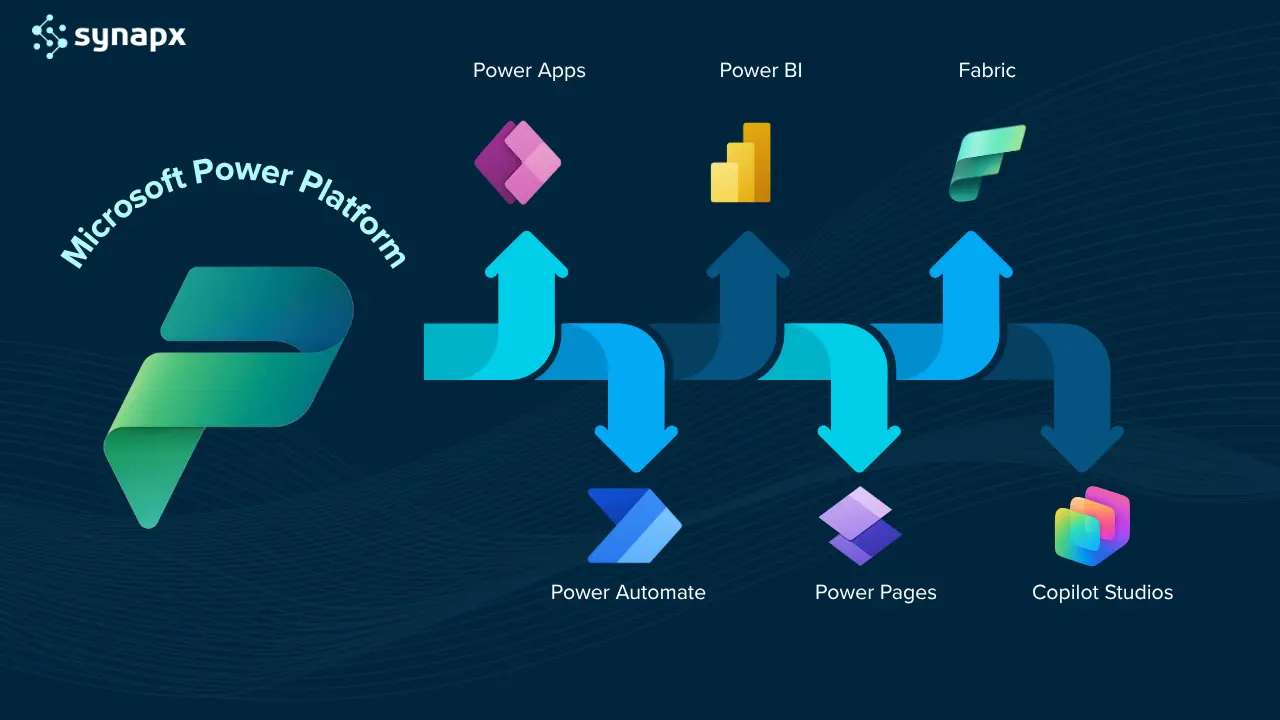
Microsoft Power Platform is a suite of low-code business solutions/tools developed by Microsoft to help businesses automate processes, analyse data, and develop custom applications. Businesses can streamline their operations using the Power Platform, to reduce manual labour, enhance data-driven decision-making, and accelerate business growth.


Components Of The Power Platform
There are 5 key components that make up the Power Platform that are powerful individually and even better when used together.
Power BI
Power BI is a business analytics tool that allows users to visualise and analyse data from various sources, enhancing decision-making processes across an organisation. The ability to integrate with over 300 built-in connectors enables Power BI to gather data from a wide range of systems and services, including sales, inventory, and customer interactions, among others. This facilitates the creation of interactive dashboards and reports that can visually communicate trends, insights, and patterns within the data, making it accessible and understandable for stakeholders at all levels of the organisation.
Usefulness and Benefits
- Data Visualisation: Converts complex data into easy-to-understand visual formats.
- Real-Time Analytics: Provides real-time insights into business performance.
- Copilot in Power BI Service: It allows users to describe visuals or insights in plain language.

Power Apps
Power Apps allows you to build custom apps with little to no code. You can develop apps that meet specific business needs, like an app for inventory management in your convenience stores, or a customer feedback app for your business. These apps can be used on smartphones, tablets, and browsers, making them accessible to your teams on the go.
Usefulness and Benefits
- Customisation: Tailor apps to specific business needs without extensive coding.
- Agility: Rapid development and deployment of solutions.
- Copilot for Power Apps: It helps creators build apps with natural language prompts, no code required.
Power Automate
Power Automate helps automate workflows and tasks across various applications. For instance, you can set up a workflow that automatically reorders stock when it falls below a certain level, or one that sends a weekly sales report to your team. It helps reduce manual tasks and improves your organisation’s overall efficiency with less scope for human error and more time to focus on high-value tasks. It now includes Copilot for Power Automate, letting users build and optimise flows conversationally.
Usefulness and Benefits
- Efficiency: Automates repetitive tasks, saving time and reducing errors.
- Workflow Optimisation: Streamlines business processes.
Power Pages
Power Pages is a component of the Power Platform focused on building and deploying low-code, secure, and scalable business websites. Power Pages can be used to create a professional web presence for your business. You can design websites for online services, customer engagement, or information sharing about your organisation. These websites can integrate seamlessly with your other Power Platform tools, enhancing your overall digital strategy. AI-assisted website building through Copilot for Power Pages makes site creation and content editing easier for non-developers.
Usefulness and Benefits:
- Web Presence: Easily create professional-looking websites.
- Integration: Seamlessly integrate with other Power Platform tools and data sources.
Copilot Studio
Copilot Studio (formerly known as Power Virtual Agents) is the AI-driven component of the Microsoft Power Platform that allows businesses to create intelligent, conversational copilots and chatbots without needing to write code.
Built on Microsoft’s Responsible AI framework, Copilot Studio enables organisations to design custom chat experiences that connect directly to their data, whether stored in Dataverse, Microsoft 365, Dynamics 365, or even third-party sources.
Businesses can use Copilot Studio to build virtual assistants that handle customer inquiries, guide employees through internal processes, or automate routine service requests, all while integrating seamlessly with the rest of the Power Platform ecosystem.
Usefulness and Benefits:
- Easily create chatbots and AI assistants using natural language, without coding or data science expertise.
- Extend and customise Microsoft 365 Copilot by connecting it to your organisation’s business data, enabling richer, context-aware responses.
- Connect chatbots to Dataverse, SharePoint, SQL, or third-party APIs to deliver precise, real-time information to users.
- Integrate Copilot Studio with Power Automate to trigger workflows directly from chatbot interactions, for example, logging service requests or updating CRM records automatically.
- Built on Azure and compliant with enterprise-grade security standards, ensuring every chatbot adheres to governance and data protection requirements.
Key Features Of The Power Platform
The key strength of the Power Platform lies in its seamless integration with existing Microsoft products like Office 365, Dynamics 365, and Azure, as well as its capability to connect with a wide range of external data sources.
Seamless Integrations with existing Microsoft Products
The key strength of the Power Platform is its ability to integrate its various components with each other, as well as with other Microsoft products like Office 365, Dynamics 365, and Azure.
The integration of Power Platform with other Microsoft products allows you to create a more cohesive and efficient IT ecosystem. It enables you to automate workflows, gain deeper insights into your data, and create custom solutions that work seamlessly with your existing Microsoft software, thereby enhancing overall productivity and operational efficiency.
Integrates with external data sources
For systems that are not directly integrated, Power Platform offers the ability to connect via APIs and custom connectors. This means that even if you’re using a Microsoft product that doesn’t have built-in integration, you can still connect it to your Power Platform applications.
The Power Platform now includes over 1,100 pre-built connectors, allowing seamless integration with Microsoft and third-party services, such as Salesforce, HubSpot, ServiceNow, and Google Workspace. These connectors allow you to integrate with popular cloud services, Microsoft products (like Office 365, Dynamics 365), and other third-party services (like Salesforce, Twitter, and Google services).
If a specific connector you need is not available, the Power Platform offers the ability to create custom connectors. This allows you to connect to any service that has a RESTful API. Custom connectors enable you to extend the platform’s capabilities to virtually any external data source or service.
With the integration of Microsoft Fabric, Power BI now leverages the Direct Lake Mode and unified OneLake data layer, enabling real-time analytics and seamless data access across Power Platform apps.
Low-Code Development Environment:
The platform is designed to be accessible to users with varying levels of technical expertise. One of the main advantages of the Microsoft Power Platform is its accessibility to non-technical users, enabling them to create apps, automate workflows, and analyse data with minimal coding. To support this, Microsoft and various other providers offer a range of training resources and courses, catering to different levels of expertise and specific needs.
While the low-code nature of the Microsoft Power Platform makes it accessible to non-technical users, If you need to develop complex applications or workflows that go beyond the basic templates and functions, a Power Platform Consultancy can help. We can help design sophisticated solutions that are tailored to your specific business needs, ensuring they are robust, efficient, and scalable. We can also provide targeted training and support, helping your team to better understand and utilise the Power Platform, thereby fostering a more self-sufficient approach in the long run.
The Dataverse
The primary data storage system within the Power Platform is Microsoft Dataverse, a secure, scalable cloud database that integrates seamlessly across all Power Platform tools and Dynamics 365 apps. It’s built on Azure, Microsoft’s cloud computing service, and integrates data from various sources into a unified format.
Since Power Platform is built on Azure, it inherits Azure’s robust security measures, including encryption, network security, and identity management. Microsoft is known for its commitment to compliance and privacy. The Power Platform adheres to various industry standards and regulations, which is particularly important if you handle sensitive customer data or operate in regions with strict data protection laws.
The Power Platform can also connect to external data sources. This means that you can keep your data where it currently resides and integrate this data with your Power Platform applications.
Advantages of This Approach:
- You can choose what data to integrate and how to use it within the Power Platform, providing flexibility in managing your business processes.
- This approach can easily scale with your business, allowing you to add more data sources or integrate additional services as needed.
- By keeping data in its original sources, you reduce the complexity and potential risks associated with moving large amounts of data to a new location.

Benefits Of The Power Platform
The Microsoft Power Platform offers a comprehensive, flexible, and scalable solution that can address the diverse and evolving needs of your business. Its capabilities in automation, data analysis, custom app development, and integration make it a great choice to enhance operational efficiency, decision-making, and customer service.
Streamlining Operations
Power Automate can significantly reduce the time spent on manual tasks such as data entry, report generation, and inventory management by automating these processes. With Power BI, you can consolidate data from all your organisations teams, enabling efficient monitoring, analysis, and reporting. This can lead to better decision-making based on real-time insights.
Customised Solutions
With Power Apps, you can develop custom applications tailored to the unique needs of your business, such as specific inventory tracking, employee management, or customer feedback systems. The platform’s ability to integrate with various Microsoft products and other third-party applications means you can create a unified system that connects all aspects of your business.
Cost and Time Efficiency
Automating routine tasks and optimising processes can lead to cost savings. The efficiencies gained from using the Power Platform can free up your and your employees’ time to focus on more strategic tasks.
Scalability and Flexibility
As your business grows, the Power Platform can scale with you, handling increased data and more complex processes. The ability to create custom solutions means that as your business needs change, your applications and workflows can evolve too.
Security and Compliance
Being a Microsoft product, the Power Platform offers robust security features, ensuring your business data is protected. The platform adheres to various compliance standards, which is crucial if you handle sensitive customer data. The Power Platform inherits Microsoft’s advanced Responsible AI, security, and compliance frameworks, ensuring adherence to GDPR, ISO 27001, and other enterprise-grade standards.
Training and Accessibility
The Power Platform is designed to be accessible to non-technical users, which means your team can quickly learn to use it. If required, there are great Power Platform consultancy specialists that can provide extensive training, making it easier for your team to get up to speed.
What’s New in 2025
The Microsoft Power Platform keeps advancing, introducing smarter AI features, enhanced data connectivity, and better governance tools. Here’s a snapshot of the latest 2025 updates:
- Copilot Integration Across All Tools: AI-powered Copilot is now embedded throughout the Power Platform, helping users create apps, reports, automations, and websites using simple natural language commands.
- Power Virtual Agents Rebranded as Copilot Studio: Microsoft’s conversational AI tool is now called Copilot Studio, enabling businesses to build intelligent bots and extend Microsoft 365 Copilot with custom data and workflows.
- Power BI Powered by Microsoft Fabric’s Direct Lake Mode: Direct Lake mode in Microsoft Fabric now powers Power BI, providing instant insights and eliminating the need for traditional data imports or refreshes.
- Over 1,100 Data Connectors Available: The Power Platform now supports more than 1,100 connectors, expanding integration options for cloud services, legacy systems, and enterprise apps.
- Enhanced Governance via the Power Platform Admin Center: New tools in the Admin Center improve compliance, security, and management visibility across environments and users.
Conclusion
In conclusion, the Microsoft Power Platform stands as a transformative tool for businesses seeking to harness the power of automation, data analysis, custom application development, and seamless integration. This platform, with its suite of dynamic tools including Power BI, Power Apps, Power Automate, Power Pages and Copilot Studio offer a unique opportunity to streamline operations, enhance decision-making, and elevate customer engagement.
For businesses seeking to optimise operations, enhance customer service, and drive growth through intelligent data utilisation and process automation, the Microsoft Power Platform offers a robust, scalable, and secure solution. It not only addresses the current challenges of business operations but also paves the way for future innovation and success. Contact us today to know more about how we can help your business attain these benefits.