Intelligent Content Management & Intranet Engagement

Microsoft SharePoint

When finding a document means asking a colleague, and the intranet is where news goes to die, the problem is not your people. Synapx builds SharePoint intranets and document management designed around tasks and search, so the answer people need is where they expect it to be.

Intranets · Documents · Knowledge

What Does Good SharePoint Look Like?

You can date a neglected SharePoint estate by its symptoms: search that returns everything except the document you need, several versions of the same policy in different libraries, an intranet homepage last updated by someone who has since left. This page is about fixing exactly that, intranets and document management people can actually find things in. The sprawling, unloved SharePoint people remember was a failure of design and governance, not of the platform; the modern product is fast, mobile, woven into Teams, and the foundation Copilot reads from. The question is not whether SharePoint can be good; it is whether yours is.

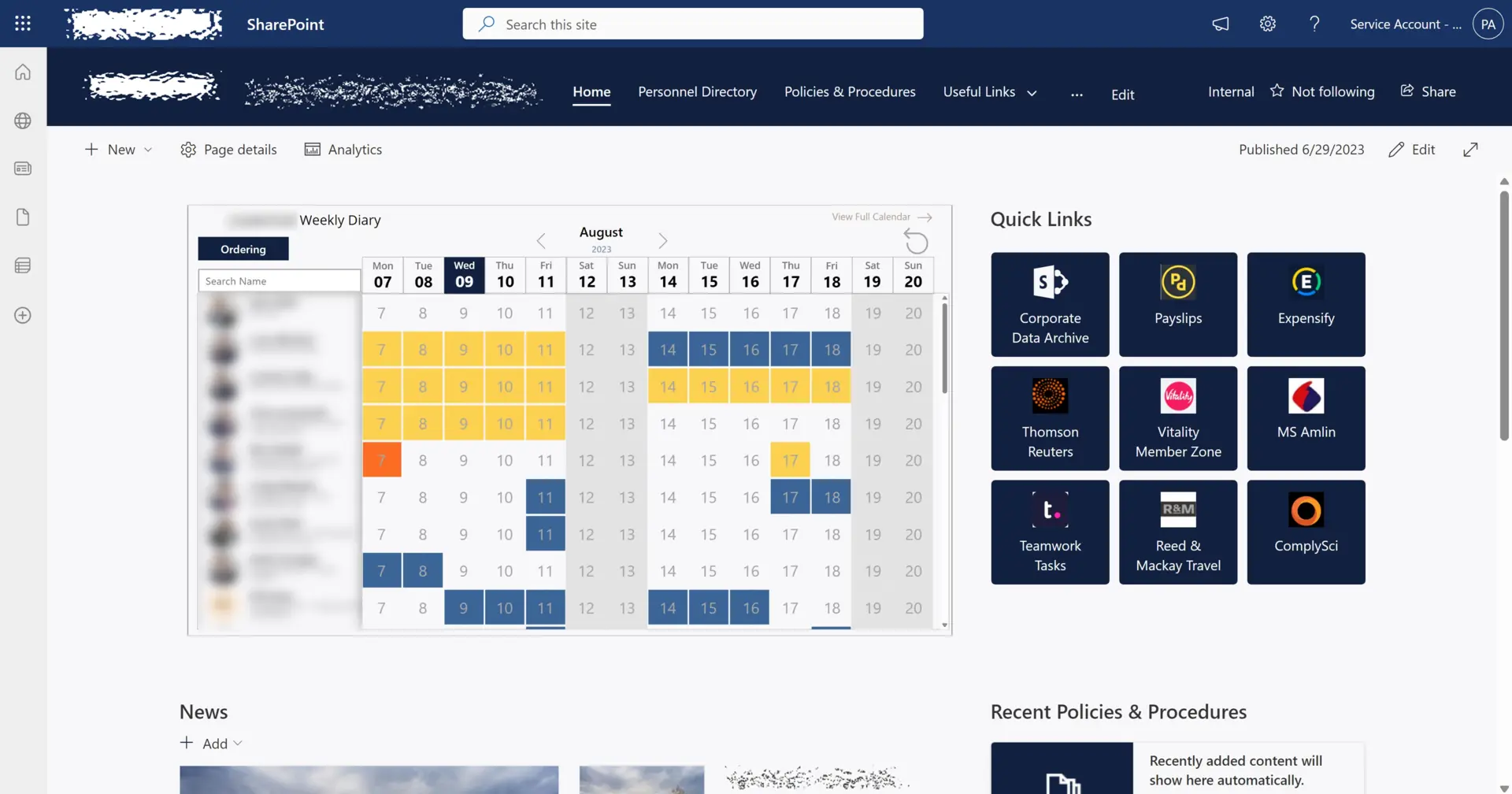
Our intranet builds start from an unfashionable premise: nobody comes to an intranet to read news. They come to find the expenses policy, book leave, and locate the one document that unblocks their afternoon. So we design the information architecture around tasks and search, give every page an owner and an expiry date, and measure engagement afterwards instead of assuming it. Launches come with a proper adoption plan, because an intranet nobody was introduced to is an intranet nobody visits twice.

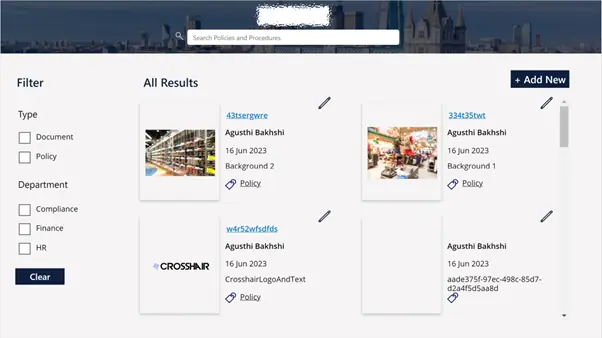
Document management gets the same discipline: libraries with real metadata rather than folder archaeology, version control and retention that satisfy compliance, and permissions that make sense to humans. That work now pays twice, because a tidy, well-permissioned SharePoint estate is precisely what makes Microsoft 365 Copilot useful rather than confidently wrong. When you are ready for the rollout itself, that conversation belongs with our Copilot practice.

The proof point we reach for is Skanska: a learning and communication platform on Microsoft 365 that reached roughly 9,000 employees and lifted adoption tenfold. Design and enablement made that difference, and both are in scope on every engagement.

And where the requirement genuinely outgrows configuration, our bespoke practice extends SharePoint with SPFx web parts, Microsoft Graph integrations and Power Platform automation, all inside your tenancy and supportable by any competent Microsoft engineer.

SharePoint delivered by a Modern Work partner

Modern Work
Modern Work
Microsoft Cloud Partner
Business Applications Specialist
Security
Security
What We Deliver

Key capabilities

Branded Intranet Experiences

Design and deploy engaging, branded intranet portals that boost user adoption and transform how teams access information.

  • Information architecture designed around tasks and search
  • Branding that makes the intranet feel like yours, not a template
  • Named owners and expiry dates on every page
  • Engagement analytics reviewed after launch, not assumed

Centralised Document Management

Implement document libraries with robust version control, compliance, and governance built in from the start.

  • Metadata and content types instead of folder archaeology
  • Retention and versioning that satisfy compliance
  • Permissions that make sense to the humans using them
  • Migration from file shares with clean-up built in

Workflow Automation

Automate routine processes and approvals to save time, reduce manual errors, and improve operational efficiency.

Security & Access Controls

Configure granular permissions and access controls that protect sensitive information without getting in the way of everyday collaboration.

Office 365 Integration

Enable real-time collaboration across devices and locations with deep Microsoft 365 ecosystem integration.

8 wks

From discovery to a modern intranet in production

100%

Microsoft 365 Copilot-ready information architecture

10x

Adoption increase on the Skanska platform we built

1

Named owner for every page, by design

Common Use Cases

Where Microsoft SharePoint earns its keep

Modern SharePoint intranet

Launch a branded, engaging intranet that surfaces news, services and knowledge where employees actually spend their day.

Document and records management

Implement governed document libraries, retention labels and metadata so compliance, legal and audit teams can find what they need.

Migration from legacy SharePoint

Move off SharePoint 2013/2016/2019 or legacy file shares onto SharePoint Online with content remediation and minimal disruption.

Copilot readiness for SharePoint

Tidy permissions, sensitivity labels and site sprawl so Microsoft 365 Copilot returns accurate, safe answers grounded in your content.

External sharing and extranets

Stand up secure external-sharing experiences for clients, partners and regulators with fine-grained access and audit trails.

Integrated workflows and approvals

Wire SharePoint libraries and lists into Power Automate flows for approvals, onboarding, contract review and policy management.

How We Work

A proven delivery approach

  1. 01 Step

    Discover

    Understand business needs, audiences, existing content estate and information architecture pain points.

  2. 02 Step

    Design

    Define site hierarchy, governance, branding, user experience and roadmap aligned to modern SharePoint.

  3. 03 Step

    Build

    Implement sites, branding, workflows and integrations, with content migration where required.

  4. 04 Step

    Adopt

    Roll out with training, champions, analytics and ongoing improvement backlog driven by real usage.

Intranet Choice

SharePoint intranet or intranet-in-a-box SaaS?

A crop of SaaS intranet products promises to spare you SharePoint. Some are good, and the honest comparison is still worth making before you add another subscription and another data silo to the estate.

SharePoint intranet or intranet-in-a-box SaaS?
Criteria SharePoint intranet Intranet-in-a-box SaaS
Cost Included in the Microsoft 365 licences you already pay forA separate per-user subscription, forever
Where content lives Your tenant, your compliance boundary, searchable by CopilotA third-party platform, another integration to govern
Design effort Needs deliberate information architecture and branding workPolished templates out of the box
Integration Native: Teams, Viva, Power Platform, Microsoft SearchConnector-dependent, and Copilot cannot always see in
Long-term flexibility Grows with the platform Microsoft keeps investing inBounded by the vendor roadmap and the renewal price

Our view, held before the SaaS vendors arrive and unchanged after: if you are on Microsoft 365, a well-designed SharePoint intranet is the defensible default, because the licence is already paid, the compliance boundary stays yours and Copilot can read every page. The design effort the SaaS products promise to spare you is exactly the work that makes an intranet good in the first place, so our advice is simple: budget for the design, not for another subscription.

Client Voices

From our Modern Work clients

"They listened, challenged our assumptions, and delivered night-and-day results."

"From the very first conversation, Synapx stood out. They didn't offer a one-size-fits-all solution; they listened, understood our workflows, and constructively challenged our assumptions. Since launch, the difference has been night and day: engagement is up, performance is dramatically better, and our teams now have a single, connected space for learning and communication. I'd recommend Synapx to any organisation looking to get more out of Microsoft technology."

Skanska

Project/Programme Manager, Skanska

FAQ

Frequently asked questions

Do you deliver modern SharePoint Online only, or also on-premises?

We focus on SharePoint Online and Microsoft 365, and we help clients migrate off on-premises SharePoint 2013, 2016 and 2019. Where hybrid is required in the short term we can support it, but the target is always cloud.

How long does an intranet project take?

A modern intranet typically goes live in 8–14 weeks including design, build, governance and initial content migration. Larger enterprise rollouts with many business units usually run 4–6 months.

Can you help us prepare for Microsoft 365 Copilot?

Yes. SharePoint readiness is one of the most important Copilot prerequisites. We run permissions audits, sensitivity labelling, retention and content cleanup so Copilot answers are accurate and do not expose data the wrong people should not see.

How do you approach content migration?

We run discovery, quality assessment and a remediation plan before any migration. We use Microsoft’s Migration Manager and third-party tools (ShareGate, Quest) as appropriate, and migrate in waves so the business is never blocked.

Can you secure external sharing with clients and partners?

Yes. We configure Entra external ID (B2B), sensitivity labels, Conditional Access and DLP so external sharing is both safe and practical – rather than blanket-disabled or blanket-allowed.

Can Synapx run the SharePoint estate for us?

Yes. Synapx-as-a-Service provides managed SharePoint and Microsoft 365 operations, including governance, site lifecycle, permissions reviews, Copilot readiness and continuous enhancement.

Our Clients

Trusted by

Glassmoon
Lanware
Micheldever Tyre Services
Midwich
Mount Anvil
Nuevo Partners
Pro Global
Seras Energy
Skanska
Ocean Conservation Trust
WA Comms
Glassmoon
Lanware
Micheldever Tyre Services
Midwich
Mount Anvil
Nuevo Partners
Pro Global
Seras Energy
Skanska
Ocean Conservation Trust
WA Comms

Start With a SharePoint Health Check

We review your information architecture, permissions, sprawl and adoption data, then hand you a prioritised plan: what to fix, what to archive and what to rebuild. Useful whether or not we do the work.

Book a SharePoint Health Check