
Case Study · LCP
Personnel Directory in Power Apps
A custom Power Apps directory that surfaces LCP’s staff with the right ordering, filtering and visual design, going beyond the limits of the out-of-the-box SharePoint personnel web part.
- Client
- LCP
- Industry
- Asset Management
- Country
- United Kingdom
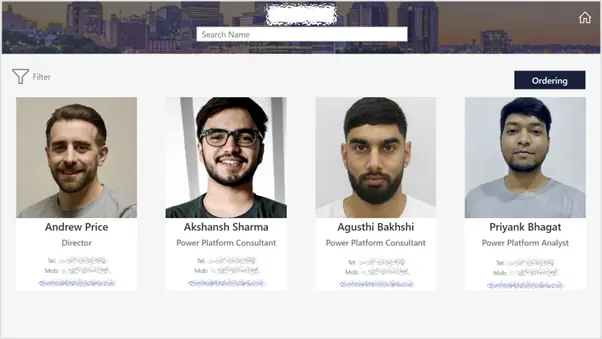
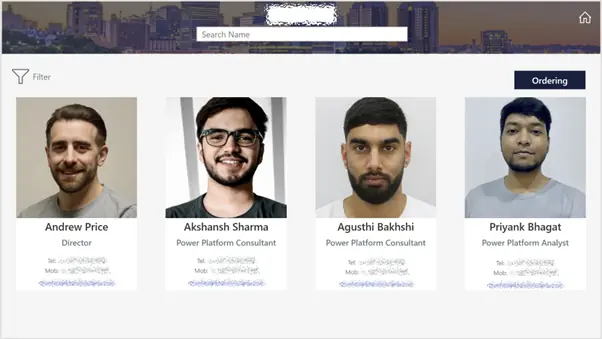
directory built in Power Apps to match brand aesthetics
staff listings with bespoke sorting logic
by role, location and other key attributes
directly to the underlying Microsoft directory
The client wanted a directory within their SharePoint site to display all their staff members, providing key contact details such as their phone number and email address, with a specific design aligned to their organisation’s aesthetic.
Challenge
The client required the ability to reorder staff listings and apply filters as needed. They wanted the staff directory to follow a specific design that aligned with their organisation’s aesthetic. Although SharePoint offers an out-of-the-box personnel web part, it did not fully meet these needs. It became clear that a custom solution was necessary, one that could leverage the company’s existing directory and utilise our expertise as Power Platform specialists to develop a tailored front-end interface using Power Apps.
Solution
Synapx began by exploring different options for building the directory, given the client’s specific formatting requirements. The standard SharePoint contacts web part was not sufficient, so we built a custom directory using Power Apps. This allowed us to control design elements, such as object placement, to achieve the desired aesthetic.
Through Power Apps, we were also able to develop a more sophisticated ordering feature by interacting directly with the underlying Microsoft directory.
Result
By leveraging Power Apps, Synapx delivered a directory that not only met the client’s design specifications but also included the enhanced functionality they needed, such as customisable staff ordering and filtering.
The integration with Microsoft’s directory ensured the solution was both seamless and efficient, offering a highly tailored user experience.
Could Your Team Benefit from a Similar Outcome?
Tell us about your goals and we'll show you how Microsoft, Data and AI can help you get there.
Book a Discovery Call