
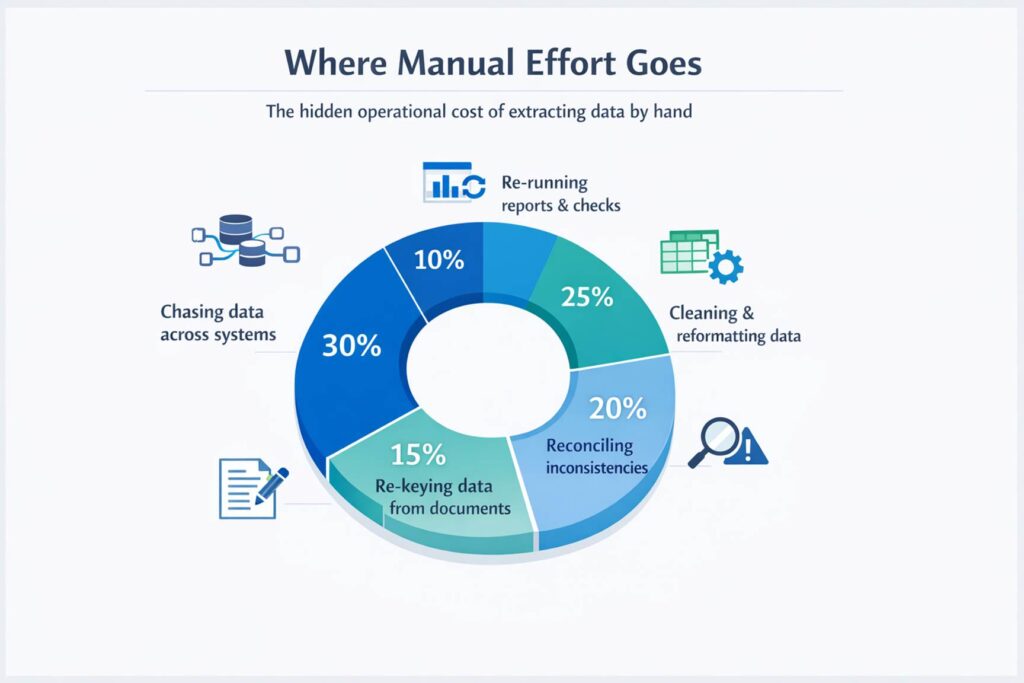
Manual data extraction rarely appears on a balance sheet, but the cost is real. It shows up in delayed reporting, duplicated effort, inconsistent figures, and time spent chasing information across disconnected systems. In many organisations, valuable data sits across CRM platforms, ERP systems, operational tools, emails, PDFs, spreadsheets, and forms. The issue is not whether the data exists. The issue is how much time and effort the business loses trying to pull it together manually.
That hidden cost becomes more serious as reporting needs grow. According to Fivetran, its 2026 enterprise data infrastructure benchmark report found that data teams dedicate 53% of engineering time to maintenance, while enterprises spend an average of $2.2 million a year keeping data pipelines running. For organisations trying to improve access to data across multiple systems, that points to a clear commercial problem: too much skilled time and budget are still being absorbed by keeping fragmented data processes going instead of using data to drive decisions and performance.
Challenges of extracting data from multiple systems?
Extracting data from one system is manageable. Extracting it from many systems is where complexity appears. Common challenges include:
- different formats and data structures across platforms
- different APIs, update schedules, and security rules
- a mix of structured data and unstructured content such as attachments, invoices, emails, PDFs, and free-text notes
- integrations that support one workflow but not continuous, business-ready access
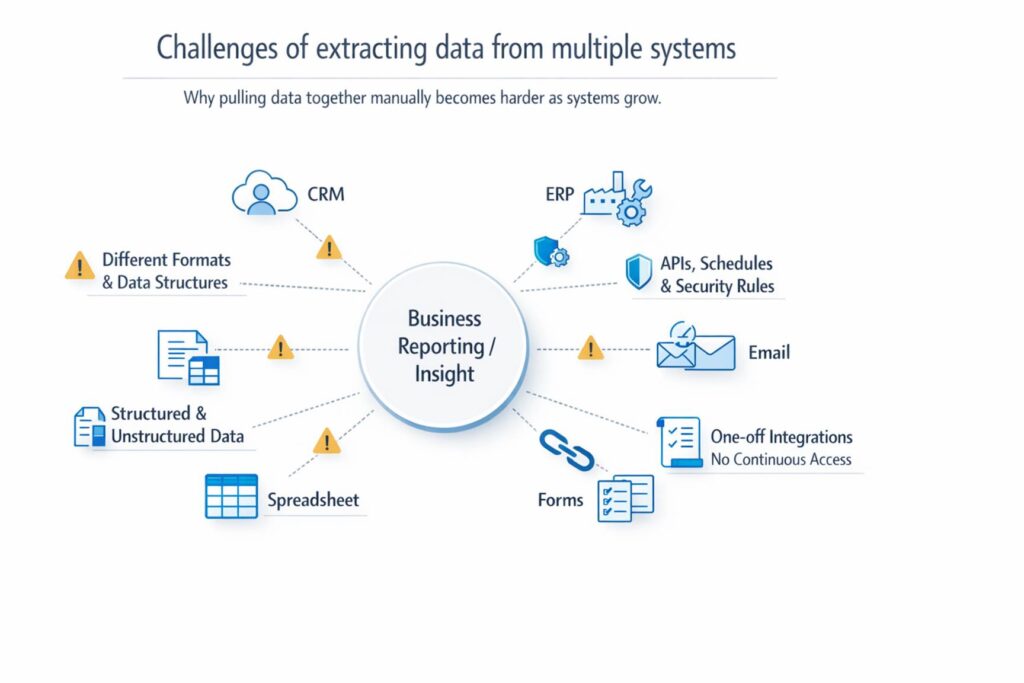
This is why many teams still fall back on manual workarounds, such as:
- downloading CSV files from multiple systems
- merging files manually in Excel
- checking figures against separate reports
- rekeying information from documents into operational systems
The process may work for a while, but it does not scale well and becomes harder to govern as the volume of data, number of sources, or frequency of reporting increases.
Why do traditional data extraction methods not scale?
Traditional extraction methods still have a place, but they often struggle when organisations need speed, flexibility, and broader access. Common limitations include:
- manual exports that are difficult to repeat consistently
- point-to-point integrations that become brittle as systems change
- custom scripts that rely on specialist knowledge and ongoing maintenance
- older ETL approaches that were not designed for fresher data, broader source variety, and easier self-service
What modern automated data extraction tools look like?
Modern automated data extraction is less about moving files around and more about creating reliable, automated access to data wherever it lives. In practice, that means:
- connecting to multiple systems directly
- standardising formats and reducing duplicate handling
- making outputs usable for reporting, analytics, operations, or AI
- supporting both structured and unstructured sources rather than treating document extraction as a separate manual task
For many organisations, this is the difference between reactive reporting and a scalable data extraction strategy that supports growth.
Why is data extraction the missing layer in many data strategies?
Many businesses have already invested in data platforms, warehouses, or lakehouse environments. That is important, but storage and analytics infrastructure alone do not automatically solve the last-mile challenge of getting the right data into the right hands quickly. A business user may still struggle to access a supplier invoice locked in a PDF, combine operational data from two systems, or pull a complete view of a process without waiting for technical support. Extraction is the layer that turns fragmented data into something usable.
How organisations automate data extraction today
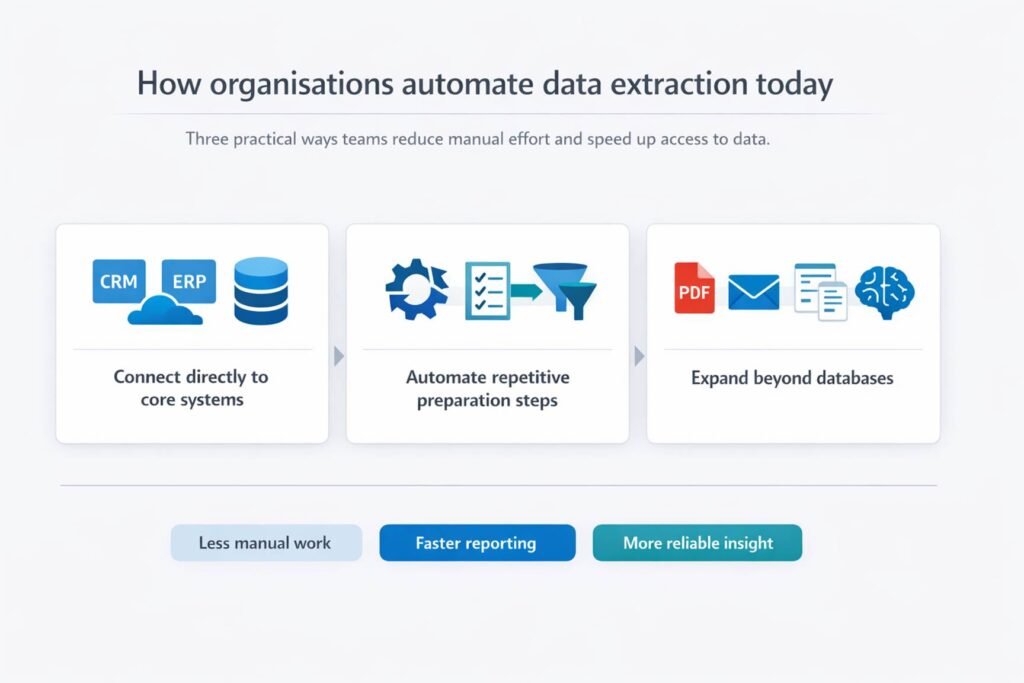
The most effective teams are reducing manual effort in three ways:
- Connect directly to core systems instead of relying on repeated exports
- Automate repetitive preparation steps so the same logic can be reused
- Expand extraction beyond databases to include documents and other unstructured sources, often with AI-assisted extraction where appropriate
This does not remove the need for governance or quality checks, but it does reduce the operational drag of assembling data by hand and helps teams move from fragmented reporting to faster, more reliable insight.
Use cases for automated data extraction from multiple systems
The use cases are broad.
- Finance teams use multi-system data extraction to consolidate actuals, invoices, and operational data for reporting.
- Insurance teams use automated data extraction to pull information from claims systems, documents, and customer records more efficiently.
- Operations teams use it to combine data from ERP, logistics, and supplier systems to improve visibility.
- Customer-facing teams use it to create a more complete view of accounts by joining CRM records with support, commercial, and document-based information. In every case, the goal is similar: reduce friction between raw data and action, while improving speed, consistency, and business responsiveness.
How does Microsoft Fabric support automated data extraction?
For organisations standardising on Microsoft technologies, Microsoft Fabric is increasingly part of the conversation because it brings together data engineering, analytics, and business intelligence in a single SaaS platform built around OneLake.
Microsoft positions OneLake as a single logical data lake with capabilities such as shortcuts and mirroring to connect to sources with less duplication and movement. That does not eliminate every extraction challenge on its own, especially where documents, specialist applications, or user-level accessibility are involved, but it provides a strong foundation for unifying and operationalising data across teams.
What to look for in automated data extraction tools?
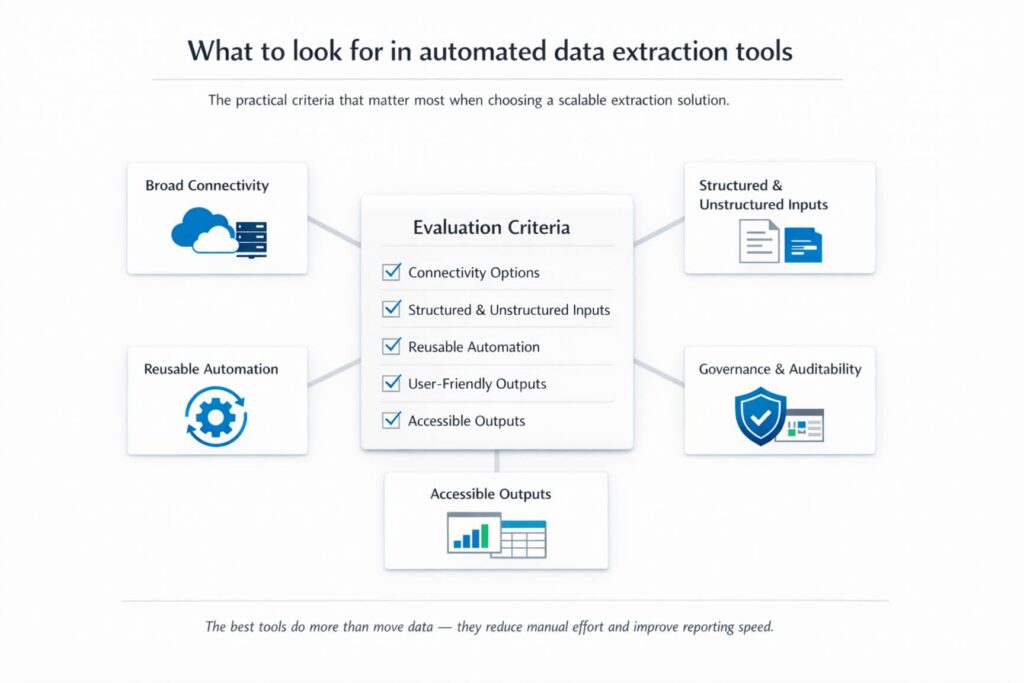
If you are evaluating data extraction tools or approaches, focus on practical criteria:
- broad connectivity across cloud and on-premises systems
- support for both structured and unstructured inputs
- reusable automation for extraction and preparation steps
- accessible outputs for business users without heavy technical dependency
- strong governance, permissions, and auditability
The strongest data extraction solutions do more than move data. They help reduce manual effort, improve reporting speed, and create a more scalable operating model.
How to improve data extraction from multiple systems?
Extracting data from multiple systems without manual work is not just an efficiency play. It is a prerequisite for:
- faster reporting
- better operational visibility
- more reliable decision-making
The organisations making progress are not simply collecting more data. They are reducing the time and effort required to access it, standardise it, and use it confidently. If this is a growing challenge in your business, it may be worth assessing whether your current data extraction approach is helping teams move quickly enough, or whether a more automated, scalable model could unlock better performance.
For organisations looking to reduce manual document handling as part of a broader data extraction strategy, solutions such as Xtract can help by capturing information from forms, emails, PDFs, and other business documents more efficiently within Microsoft 365 workflows. Used in the right context, it can help teams reduce repetitive admin, improve consistency, and speed up access to usable data.