
Personnel Directory - Power Apps
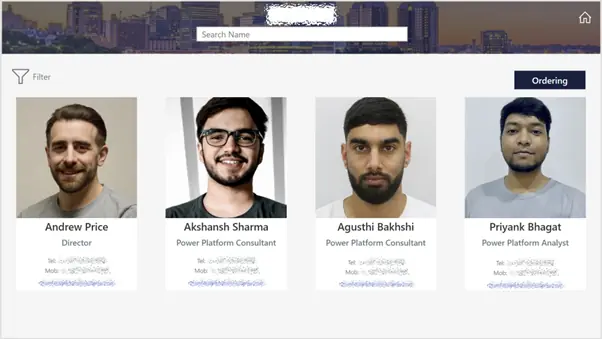
The client wanted a directory within their SharePoint site to display all their staff members, and provided key contact details such as their phone number and email address.
Case Study100%
reduction in manual effort, enabling instant report generation and seamless sharing
50%
faster report generation, optimising SQL views and automating Power BI processes
95%
improvement in data accuracy, ensuring reliable and consistent revenue reporting
70%
increase in user engagement, driving better adoption and interaction with reports

The Challenge
The client required the ability to reorder staff listings and apply filters as needed. Additionally, they wanted the staff directory to follow a specific design that aligned with their organisation’s aesthetic. Although SharePoint offers an out-of-the-box personnel web part, it didn’t fully meet these needs. It became clear that a custom solution was necessary, one that could leverage the company’s existing directory and utilise our expertise as Power Platform specialists to develop a tailored front-end interface using Power Apps.
Our Solution
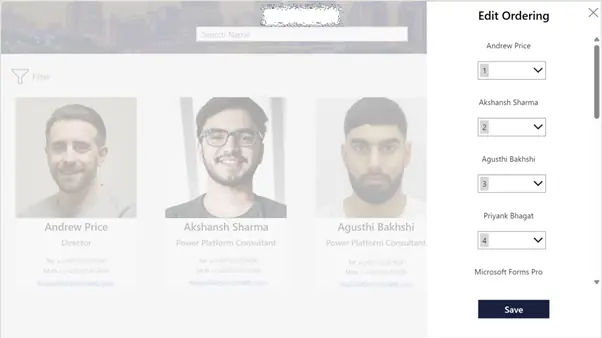
We began by exploring different options for building the directory, given the client’s specific formatting requirements. The standard SharePoint contacts web part was not sufficient, so we opted to build a custom directory using Power Apps. This allowed us to control design elements, such as object placement, to achieve the desired aesthetic. Moreover, through Power Apps, we were able to develop a more sophisticated ordering feature by interacting directly with the underlying Microsoft directory.
The Result
By leveraging Power Apps, we were able to deliver a directory that not only met the client’s design specifications but also included the enhanced functionality they needed, such as customisable staff ordering and filtering. The integration with Microsoft’s directory ensured the solution was both seamless and efficient, offering a highly tailored user experience.
Other Case Studies
At Synapx, we’re proud to show how our solutions have transformed the way our clients work and operate. Below you can see our latest client project.
Dynamics 365 Automation: How Midwich Reduced Manual Work Across Order Processing, Procurement, and Pricing
The client approached us to solve the operational strain left by a complex Dynamics 365 ERP rollout, with a focus on reducing manual effort and creating a more practical path to...

Learn Fast - Share Knowledge, Scale Adoption
Centralised Subscriber Data Integration with Power Automate
The client approached Synapx for support with the Power Platform through a time-and-materials engagement. The project focused on centralising subscriber data management and streamlining processes. This involved integrating three distinct mailing list forms into a unified database to enable efficient...

Migrating Power BI to Fabric Lakehouse with Medallion Architecture
The client approached us to automate their material transfer processes between internal and external sites. The project aimed to centralise operations and improve efficiency by replacing their manual methods with an automated system for real-time tracking. We delivered the solution...

Power BI Reporting & Power Apps AVC Calculator
The client approached Synapx to provide Power Platform support under a time-and-materials engagement. The project aimed to enhance data analytics and streamline business processes through Power BI implementation and creation of an AV Calculator from Excel to Power Apps,...

Power Platform Center of Excellence Implementation - Power BI
The client approached us in order to implement a reporting system to provide oversight on the implementation of power-platform within their organisation.
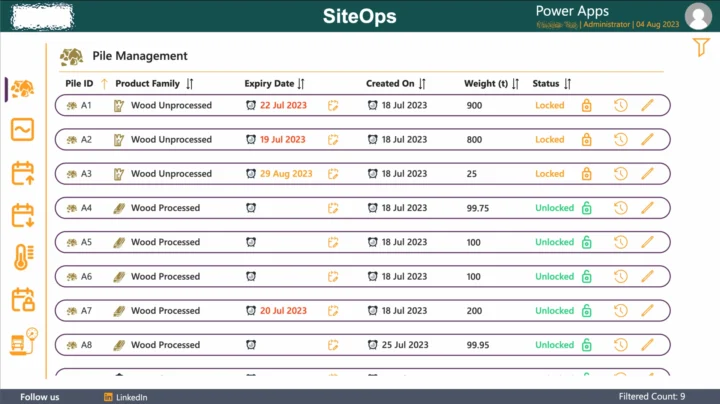
Material Management Application with Business Central Automation - Power Apps with Power Automate
The client approached us needing a system to automate their processes for managing the transfer of different materials held in piles between their internal and external sites.
Policies and Procedures - Power Apps with SharePoint Documents Library
The client wanted an application to effectively manage their companies policies and procedures from within a SharePoint documents library.

Personnel Directory - Power Apps
The client wanted a directory within their SharePoint site to display all their staff members, and provided key contact details such as their phone number and email address.
Book A Free Discovery Session
Schedule a FREE call with our power platform specialists.
Book a Discovery Session