Most businesses are already using Microsoft Power Automate in some way.
But using automation is not the same as getting real value from it.
A lot of teams build simple flows that save a few minutes here and there. Helpful, yes. Transformational, not really.
The biggest gains usually come from fixing the processes that waste time every single day. Slow approvals, repetitive admin, manual file handling, delayed follow-ups — these are the bottlenecks that quietly drain hours across teams.
That is where the right Power Automate flows can make a real difference.
This guide focuses on 10 practical Microsoft Power Automate examples businesses are using to reduce manual work, improve consistency, and make day-to-day operations easier. These are not generic ideas. They are the kinds of flows that deliver measurable time savings when built properly.
If your team is already using Microsoft 365 but still dealing with too much manual work, these are the workflows worth looking at first.
Quick Comparison: Best Power Automate Flows for Business
| Flow | Best For | Main Outcome |
|---|---|---|
| Approval workflows | HR, finance, ops | Faster decisions |
| Employee onboarding | HR / IT | Better new starter experience |
| File and data processing | Finance / ops | Removes manual admin |
| CRM lead follow-ups | Sales | Faster lead response |
| KPI reporting | Leadership / ops | Better visibility |
| IT helpdesk routing | IT teams | Faster support |
| Contract expiry alerts | Legal / procurement | Avoids missed deadlines |
| Leave calendar sync | HR / teams | Better leave visibility |
| Meeting action tracking | All teams | Better follow-through |
| Customer feedback routing | Customer teams | Faster issue response |
Power Automate Use Cases
1. Automated Approval Workflows
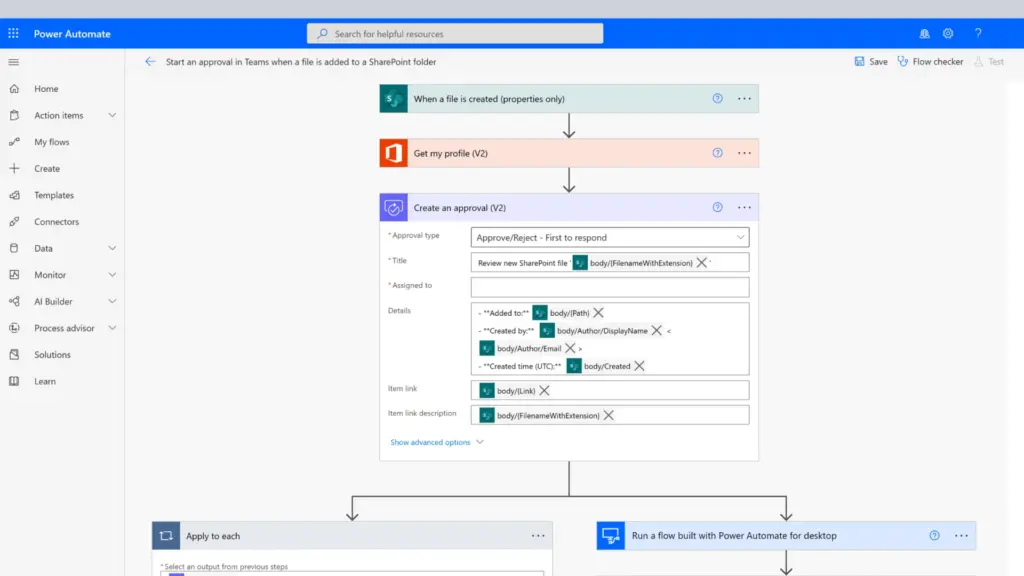
Approval processes are one of the easiest places to create instant value.
Whether it is leave requests, purchase approvals, expenses, or contracts, manual approvals are often slow because they depend on email chains and people remembering to respond.
With Microsoft Power Automate, a request can trigger an approval automatically, route to the right person in Microsoft Teams or email, send reminders, and log the outcome.
The result is a much faster approval cycle and far better visibility.
For most businesses, this is one of the quickest wins because it removes delays without changing the process itself.
2. New Employee Onboarding Flows
Onboarding is often more manual than it needs to be.
HR teams are chasing paperwork, IT is setting up access, managers are trying to coordinate tasks, and new starters are left waiting.
A well-built onboarding flow can connect all of this.
When a new employee is added to a list or HR system, the flow can:
- notify IT to provision access
- send welcome emails
- create Teams channels
- assign manager tasks
This creates a smoother first experience for new hires and saves HR teams hours every month.
For growing businesses, this is one of the most valuable operational automations.
3. File Processing and Data Formatting
This is where businesses often save the most time.
A lot of finance, operations, and reporting teams still spend hours manually cleaning spreadsheets, moving files, or reformatting data before it can be used.
That work is repetitive, frustrating, and easy to get wrong.
With Microsoft Power Automate, files arriving by email or being uploaded to a folder can trigger a full automated process.
That can include:
- moving files to Microsoft SharePoint
- running formatting scripts
- updating databases
- notifying stakeholders
Real client example
A Synapx client in financial services was spending an hour every day manually formatting two Excel workbooks before uploading them to a database.
The process was repetitive and formulas often broke when file formats changed.
Synapx built a flow that:
- triggered when emails arrived
- saved files to SharePoint
- ran an Office Script to clean and format data
- pushed data into the database
- sent automatic notifications
The result:
- 83% reduction in processing time
- zero formatting errors
- no manual intervention needed
This is exactly the kind of automation that creates real business value.
4. CRM Lead Alerts and Follow-Ups
Missed leads cost money.
In many businesses, new leads are still missed because notifications are slow, inboxes are overloaded, or follow-up tasks are forgotten.
A lead flow can instantly:
- alert the assigned salesperson in Teams
- create follow-up tasks
- send reminders if nothing happens
This helps:
- improve response times
- reduce missed opportunities
- give managers more visibility
For sales teams, this is a simple but high-impact automation.
5. Scheduled KPI and Reporting Flows
Many businesses still rely on someone manually pulling reports every week.
This is one of the most common low-value tasks that automation can solve.
A scheduled flow can:
- pull data from SQL, Dataverse, or SharePoint
- compile a report
- send a digest by email or Teams
This means teams get updates automatically without someone losing hours building the same report again and again.
It is one of the easiest ways to improve visibility without adding extra meetings.
6. IT Helpdesk Ticket Routing
IT support teams often lose time manually sorting tickets.
Requests come in from email, Teams, forms, or chat, and someone has to work out where they should go.
With Power Automate, requests can be:
- categorised automatically
- routed to the right support queue
- logged in ServiceNow or Jira
- acknowledged instantly
This speeds up support, improves SLA performance, and gives users more confidence that issues are being handled.
7. Contract and Document Expiry Alerts
Missed renewal dates can create serious problems.
Contracts, software licences, insurance policies, and compliance certificates all need tracking. Yet many businesses still rely on someone remembering to check them.
A simple expiry flow can monitor dates in SharePoint or Dataverse and automatically alert owners before deadlines.
This is one of the simplest automations to build, but it prevents:
- missed renewals
- compliance risk
- avoidable disruption
8. Leave Calendar Sync and Visibility
Leave management is a common pain point, especially when teams use separate HR tools.
Managers often have to switch between systems just to see who is off.
Power Automate can connect leave systems to Microsoft tools and create a live shared leave calendar.
Real client example
One Synapx client needed leave data from Timetastic shown inside SharePoint.
There was no ready-made connector.
Synapx built a solution using:
- HTTP connectors
- Dataverse
- Power Apps calendar views
- SharePoint embedding
The result:
- real-time leave visibility
- no manual updates
- much better user adoption
This is a great example of using Power Platform to make existing systems work better.
9. Meeting Follow-Up and Action Tracking
Meetings often create actions that are quickly forgotten.
This is a common problem in busy teams.
A post-meeting flow can:
- capture actions
- assign tasks
- set deadlines
- send reminders
This helps teams follow through without relying on memory or chasing updates later.
For businesses already using Teams heavily, this can quietly improve accountability.
10. Customer Feedback Routing
Customer feedback often gets lost because it arrives in too many places.
Forms, emails, surveys, and support messages all need sorting.
A feedback flow can:
- log submissions
- analyse sentiment
- alert account managers for urgent issues
- capture positive feedback for case studies
This helps businesses respond faster and improve customer experience without creating more admin.
What Makes a High-Impact Power Automate Flow?
The best automations are not always the most complex.
The ones that create the biggest impact usually have three things in common.
First, they solve a real operational bottleneck. The best flows remove tasks that people repeat every day or every week.
Second, they run reliably. A flow that constantly breaks creates more work than it saves.
Third, they scale. The right automation should improve consistency across teams, not just help one person.
That is why the best Power Automate projects usually start with business pain points, not with the technology itself.

How to Get Started?
The best way to start with Microsoft Power Automate is to pick one process that wastes time today.
Usually, that is:
- approvals
- reporting
- manual file work
- follow-up tasks
Start there.
The goal is not to automate everything at once. It is to fix the biggest source of friction first, prove value quickly, and then scale from there.
Ready to Get More Value from Power Automate?
Most businesses already have opportunities to automate more than they realise.
The challenge is knowing which flows will make the biggest difference.
Synapx helps businesses design and build practical Power Automate solutions that save time, reduce manual work, and improve day-to-day operations.
If your team is still losing time to repetitive tasks, now is a good time to fix the processes that are slowing you down.