

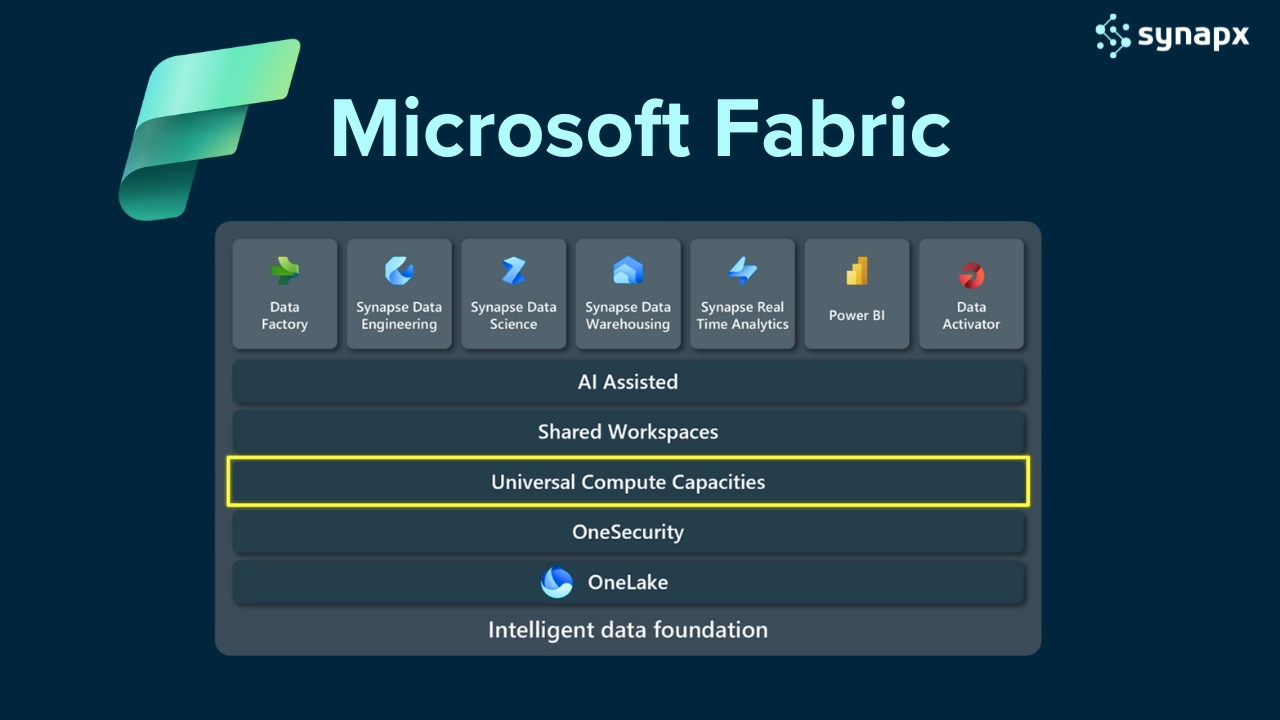
Microsoft Fabric pricing confuses people because it works differently from almost every other software licence. There is no per-user fee. There is no separate charge for Power BI, data engineering, or AI. There is one capacity-based subscription that covers everything, and understanding what that means in practice determines whether Fabric is affordable for your organisation or not.
This guide gives you real numbers, explains the key decisions that affect cost, and tells you exactly when per-user Pro licences are and are not required.
GBP pricing note: Costs below are estimates based on UK Azure pricing as of early 2026. Actual pricing is subject to your Microsoft agreement, region, and whether you choose to pay-as-you-go or reserved capacity. Use these numbers for budgeting purposes.
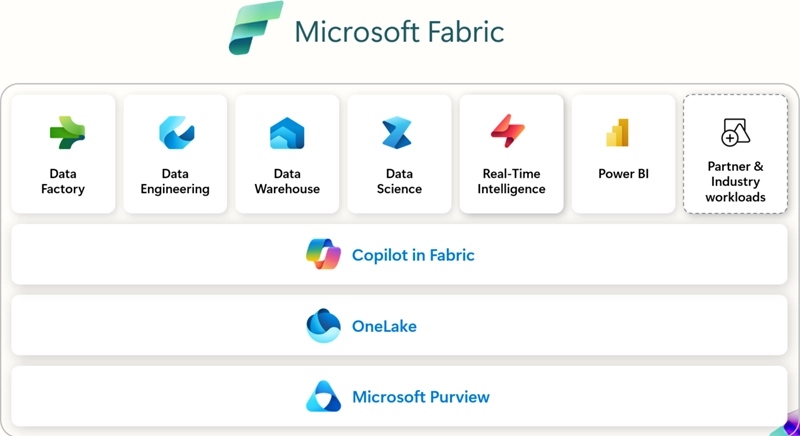
Fabric Capacity: What Does It Mean?
Microsoft Fabric pricing is capacity-based, not user-based. This means instead of paying per user (like Power BI Pro), you’re paying for the overall computational power your organisation needs to run reports, load data, perform AI modeling, refresh dashboards, and more.
It’s like buying an engine:
- A small engine (F2) is fine for light usage
- A larger engine (F64) can handle big data pipelines, complex queries, and multiple teams running analytics in parallel
The more you’re doing with your data, and the faster you want results, the more capacity you’ll need.
This works only if SKU is >= F64, developer needs pro license and <F64 each user needs pro license.
What Is a Capacity Unit (CU)?
A Capacity Unit is Microsoft’s way of measuring the resources allocated to your Fabric environment, CPU, memory, and I/O. You subscribe to a Fabric SKU, such as F2, F4, or F64, and that defines how many Capacity Units (CUs) you get.
Each higher SKU offers:
- More computing power
- Higher concurrency limits
- Faster refresh rates
- Better performance for demanding workloads
How Fabric Pricing Works
Fabric runs on capacity units (CUs) – Microsoft’s measure of compute power (CPU, memory, I/O). You subscribe to a Fabric SKU that defines your CU allocation. All of your organisation’s Fabric workloads – Power BI reports, data pipelines, Spark notebooks, AI models, and real-time analytics share that capacity pool.
The analogy that works best: it is an engine, not a per-seat licence. You buy the engine size you need, and everyone in your organisation uses it. The bigger the engine, the more you can run simultaneously and the faster it performs.
Every Fabric SKU: GBP Pricing (2026)
| SKU | CUs | Est. monthly (GBP) | Pro licence needed? | Right for |
| F2 | 2 | ~£200 | Yes (per consumer) | Proof of concept, small team dashboards |
| F4 | 4 | ~£400 | Yes (per consumer) | Small production workloads |
| F8 | 8 | ~£800 | Yes (per consumer) | Growing teams, real-time dashboards |
| F16 | 16 | ~£1,600 | Yes (per consumer) | Enterprise analytics, large data models |
| F32 | 32 | ~£3,200 | Yes (per consumer) | Multiple teams, complex pipelines |
| F64 | 64 | ~£6,400 | No – included in SKU | Large orgs: multi-team, AI workloads |
| F128 | 128 | ~£12,800 | No – included in SKU | Enterprise-wide, high-concurrency |
| F256 | 256 | ~£25,600 | No – included in SKU | Largest enterprise deployments |
The F64 threshold is the most important pricing decision in Fabric. Below F64, every user who views published Power BI content needs a Pro licence (~£12.50/user/month). At F64 and above, those licences are replaced by the capacity subscription. Run the numbers for your user count before assuming F32 is the right ceiling.
What Is Included in Every Fabric Subscription
A Fabric capacity subscription is not just compute. It unlocks the entire platform:
- Power BI Premium – reports, dashboards, paginated reports, large dataset storage, Copilot
- Data Factory – data ingestion pipelines, dataflows, ETL orchestration
- Synapse Data Engineering – Spark notebooks, lakehouses, Delta Lake storage
- Synapse Data Science – ML model development and deployment, Azure ML integration
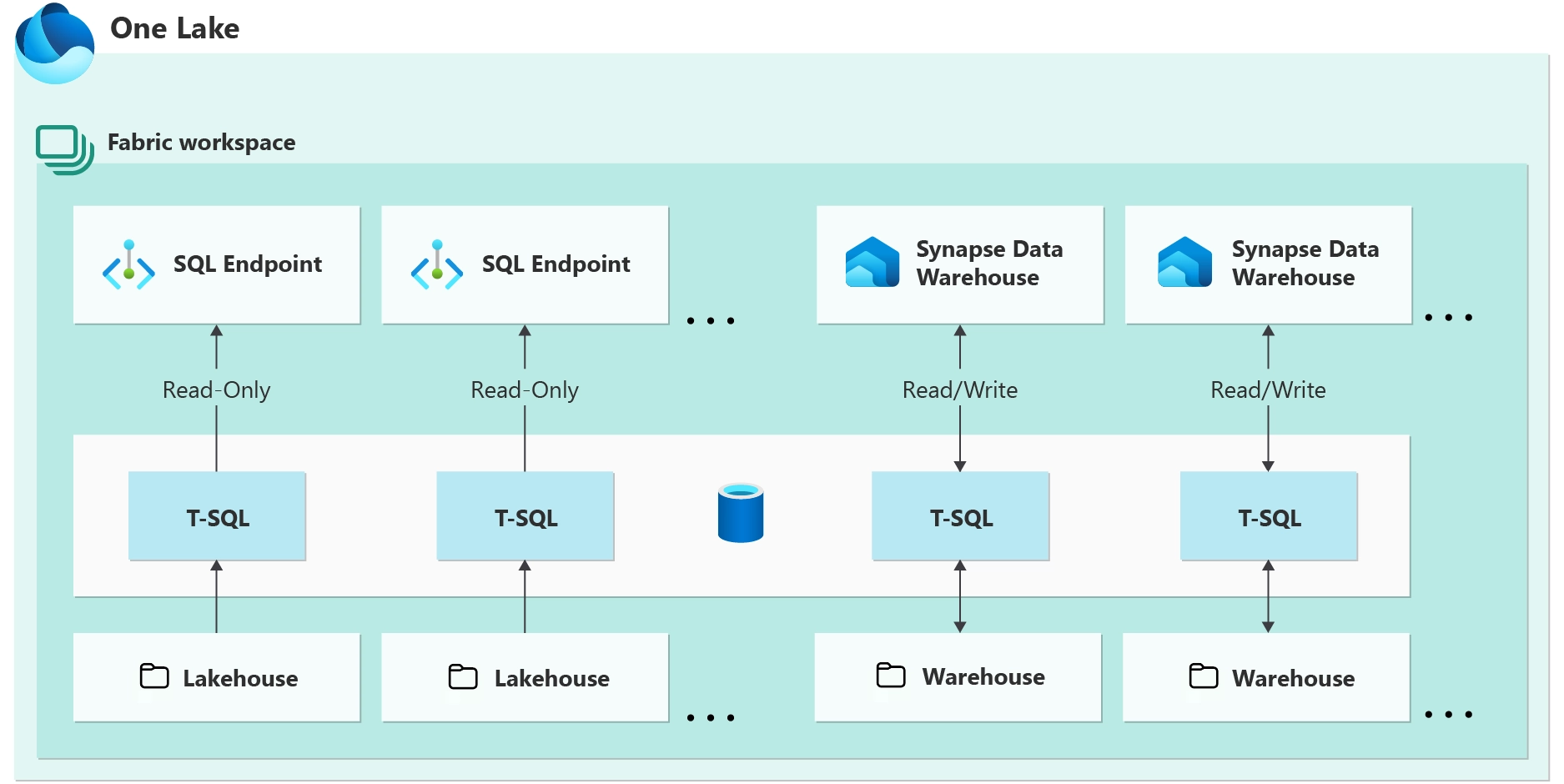
- Data Warehouse – scalable SQL analytics engine
- Real-Time Intelligence – KQL databases, event streams, real-time dashboards
- Data Activator – no-code event-driven automation triggered by data conditions
- OneLake – unified data lake storage for the entire organisation
- Microsoft Purview – governance, data classification, lineage
For organisations currently paying separately for Power BI Premium, Azure Synapse, and Data Factory, consolidating onto a Fabric F SKU almost always reduces total licence spend while adding significant new capability.
Pay-As-You-Go vs Reserved Capacity
| Option | Billing | Discount vs PAYG | Best for |
| Pay-as-you-go | By the second – pause to save | Baseline | Dev/test, PoCs, irregular workloads |
| 1-year reserved | Fixed monthly | ~30–40% cheaper | Production workloads with consistent usage |
Pay-as-you-go is valuable during the pilot phase because you can pause capacity when not in use – outside business hours, at weekends, and pay nothing for idle time. Once your workloads are established and running consistently, switching to reserved capacity typically saves 30–40%.
Is Fabric Cheaper Than What You’re Currently Paying?
For organisations on Power BI Premium alone, Power BI Premium P1 capacity was priced around £4,500/month. The equivalent Fabric F64 is approximately £6,400/month, but includes six additional workloads (Data Engineering, Data Science, Data Warehouse, Real-Time Intelligence, Data Activator, Databases) that Power BI Premium does not. If your organisation is using or planning to use any of those workloads, Fabric is almost certainly cheaper on a total-cost basis.
For organisations paying separately for Power BI Pro + Azure Synapse + Data Factory: The combined monthly cost of those three frequently exceeds a single Fabric F8 or F16 subscription that delivers all of them plus more. A direct cost comparison using your actual user counts and workload volumes will typically show Fabric is significantly more cost-effective.
For smaller organisations starting from scratch: F2 (~£200/month) or F4 (~£400/month) on pay-as-you-go is a very low-cost entry point for a genuinely capable data platform. These SKUs require individual Pro licences for consumers, but at small scale (under 20 users), that remains competitive with alternative platforms.
How to Estimate the Right SKU
The most common sizing mistakes: starting too small and throttling production workloads, or starting too large and paying for unused capacity. Four factors drive SKU selection:
- Data refresh frequency – daily batch vs hourly vs near-real-time has a significant impact on CU consumption
- Concurrent users and report loads, how many people are actively using reports and dashboards simultaneously
- Workload mix – Spark notebooks and ML model training are significantly more CU-intensive than standard Power BI reporting
- Data volumes – the size of datasets being processed, stored in OneLake, and queried in the warehouse
Synapx typically recommends starting on F4 or F8 pay-as-you-go for an initial proof of concept, monitoring utilisation through the Fabric Capacity Metrics App, and right-sizing before switching to reserved capacity for production.
Estimating Your Needs
So, how much capacity do you need? It depends on factors like:
- How often do you refresh your data?
- How many reports and dashboards are running simultaneously?
- Are you building dataflows or running AI models?
- Do you need overnight processing or 24/7 real-time access?
Synapx helps clients assess their data usage and recommend the right tier, avoiding overspend while ensuring performance.
Supercharge Fabric with Xscale
While Microsoft Fabric provides a powerful foundation, many organisations need help turning that raw capability into business-ready insights fast. That’s where Xscale, our accelerator platform, comes in.
Xscale plugs directly into your Microsoft data estate and helps you:
- Launch Fabric projects faster with prebuilt data connectors
- Standardise governance and compliance across departments
- Provide business users with intuitive dashboards and no-code workflows
- Streamline user onboarding and data access
- Track capacity usage and optimise performance in real time
It’s the perfect companion for scaling Fabric across the enterprise, especially if you want rapid ROI with lower technical overhead.
Final Thoughts
Microsoft Fabric capacity pricing isn’t just another cost, it’s a smarter, more scalable way to pay for a unified analytics environment.
And with everything from Power BI and lakehouses to notebooks and governance rolled into one license, the value is exceptional.
If you’re curious about how much Fabric capacity your organisation might need or want help setting up a cost-effective proof of concept, the Synapx team is ready to help.
Let’s Chat
Whether you’re evaluating Microsoft Fabric or ready to scale your analytics environment, we’re here to help.
- Want a personalised Fabric capacity estimate?
- Curious how Xscale could accelerate your rollout?
- Need help navigating governance, backup, or compliance?
Get in touch with Synapx and take the first step toward a smarter data strategy.