Most blog posts about these two platforms end up saying the same thing; Fabric is good for Microsoft shops, Databricks is good for data engineers, and it depends on your needs. You can find that take anywhere.
This isn’t that blog.
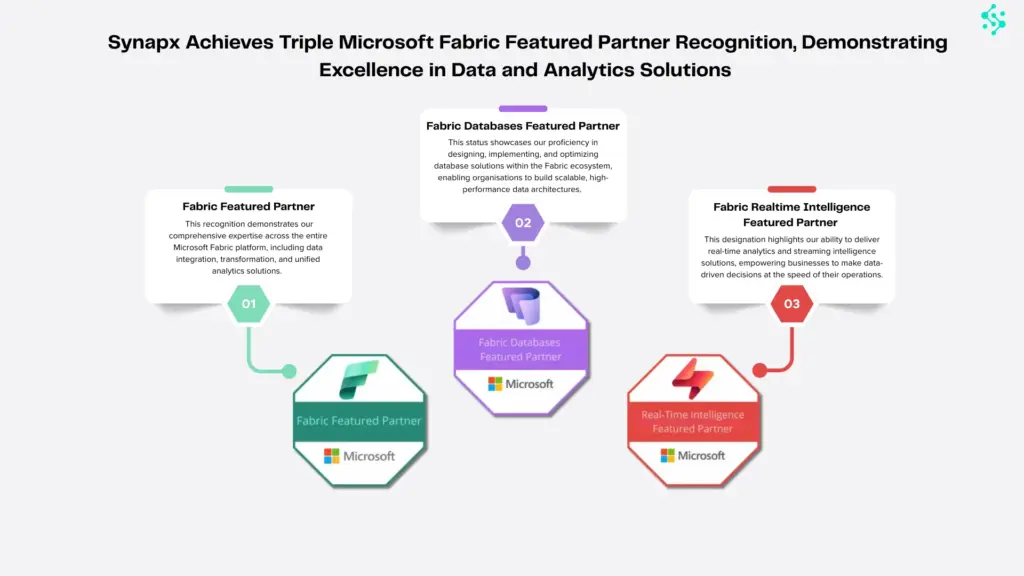
We’re a Microsoft Fabric Featured Partner. We’ve implemented both platforms across enterprise engagements. We’ve watched organisations make the wrong choice, in both directions, and we’ve watched them pay for it. One of the most common; a mid-market professional services firm that chose Databricks because it “felt more enterprise”, spent nine months building infrastructure their two-person data team couldn’t maintain, and ended up migrating to Fabric anyway at significant cost. The other direction happens too; organisations that default to Fabric and hit a wall the moment they need production-grade ML.
This blog follows is what we’ve actually learned. The information that doesn’t show up on the feature comparison pages.
What is Microsoft Fabric?
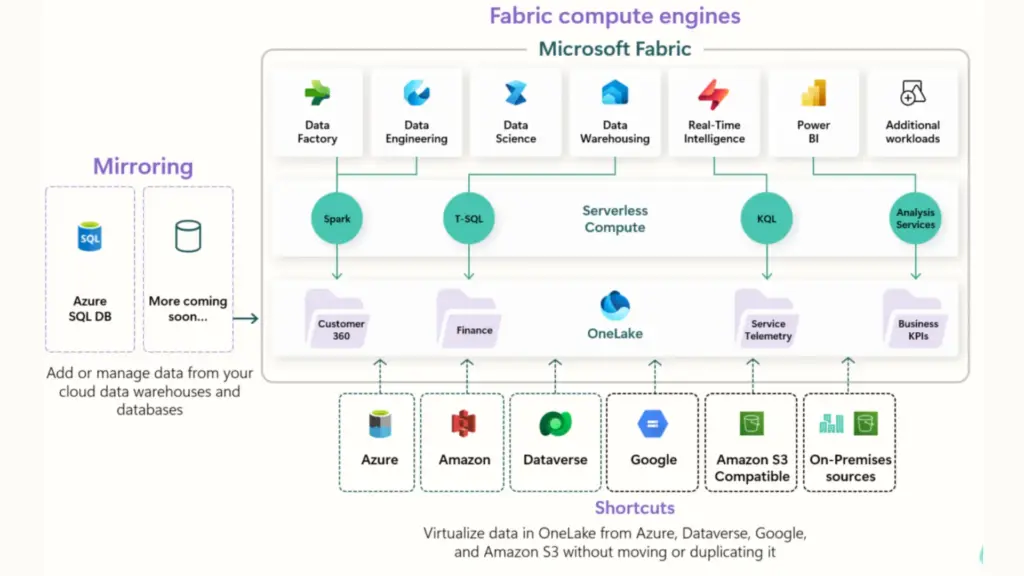
Microsoft Fabric, launched in May 2023, is a unified SaaS analytics platform that consolidates what were previously separate Microsoft products, Azure Synapse Analytics, Azure Data Factory, Power BI, and Azure Data Lake Storage, into a single experience built on top of OneLake.
The core design philosophy is simplicity at scale; manage one capacity, one security model, one data lake, and get everything from ingestion to reporting without stitching services together. For organisations that have previously run separate Synapse, ADF, and Power BI Premium estates, consolidation alone can represent meaningful cost savings.
Key characteristics: OneLake as a single organisational data lake with no duplication across services; Power BI Direct Lake mode for near-real-time BI without import or DirectQuery performance tradeoffs; fully managed infrastructure with no cluster management; Dataflow Gen2 for no-code data pipelines; and Copilot across all paid SKUs (F2 and above, as of April 2025) for AI-assisted development.
What is Databricks?
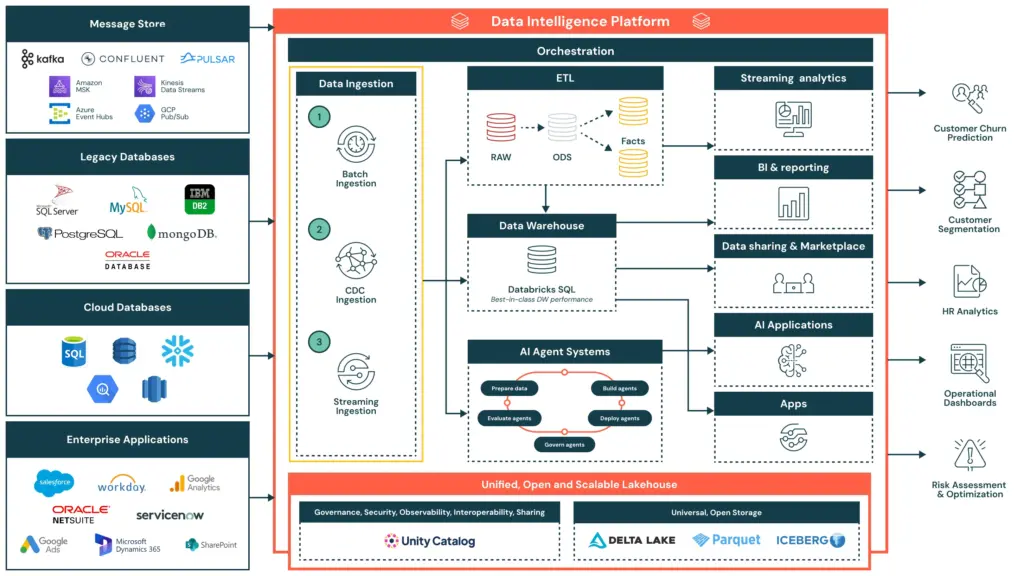
Databricks, founded in 2013 by the creators of Apache Spark, is a cloud-based lakehouse platform built for teams with serious data engineering and data science capability. Where Fabric abstracts infrastructure away, Databricks exposes it, giving engineers the control to tune every job, cluster, and pipeline to exacting requirements.
The platform is centred on Delta Lake (open-format, ACID-compliant storage), MLflow (end-to-end ML lifecycle management), and Unity Catalog (cross-cloud governance). Databricks runs on Azure, AWS, and GCP with genuine portability, your Delta Lake tables are yours, not locked to a vendor’s storage layer.
Key characteristics: full code-first environment in Python, Scala, and SQL; native MLflow for experiment tracking, model registry, and production serving; Unity Catalog for fine-grained governance across all clouds; consumption-based pricing (DBUs) that rewards optimised, variable workloads; and DBRX, Databricks’ own LLM, for AI-native workflows.
Microsoft Fabric vs Databricks: Feature Comparison
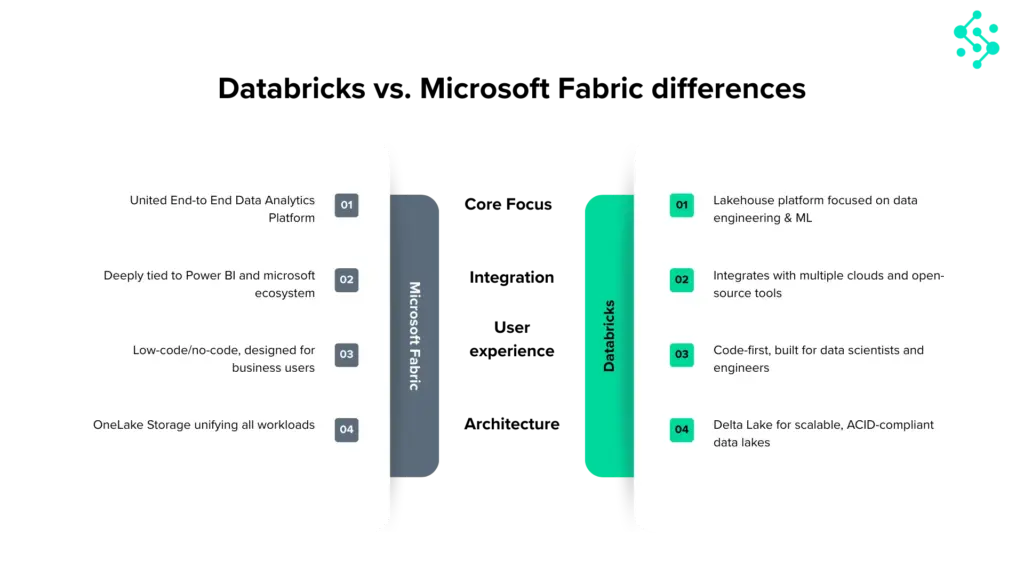
The table below covers the dimensions that actually drive platform decisions in enterprise engagements. Read what follows it before drawing conclusions from any single row.
| Category | Microsoft Fabric | Databricks |
| Architecture | OneLake — unified SaaS lakehouse on Azure | Delta Lake — open format, multi-cloud PaaS |
| Primary audience | Analysts, business users, mixed teams | Data engineers, data scientists |
| Infrastructure management | Fully managed — no cluster config | PaaS — more control, more responsibility |
| Power BI / BI reporting | Native Direct Lake — unmatched integration | Works with Power BI, but via connector |
| ML / AI maturity | AutoML, Azure ML, Copilot in notebooks | MLflow, Feature Store, DBRX — industry-leading |
| Real-time analytics | Eventstream, KQL, Real-Time Intelligence | Delta Live Tables, Spark Streaming |
| Governance | Microsoft Purview + OneLake Security (preview) | Unity Catalog — more mature, cross-cloud |
| Multi-cloud | Azure only | Azure, AWS, GCP |
| Pricing model | Capacity-based F SKUs — predictable | DBU consumption — flexible, variable |
| Low-code / no-code | Dataflow Gen2 — strong self-service | Minimal — code-first platform |
| Open source | Partially (Delta Lake, Spark) | Fully open — Delta Lake, MLflow, Spark |
| Vendor lock-in risk | Higher — OneLake tied to Azure/Fabric tenant | Lower — open formats, multi-cloud |
| Copilot / AI assist | Copilot on all paid SKUs (April 2025) | Databricks Assistant (DBRX) |
The rows where Fabric leads; BI integration, managed infrastructure, low-code capability, matter most to mixed-skill teams where business analysts and data engineers share the same platform. The rows where Databricks leads, ML maturity, multi-cloud, open-source portability, matter most when the platform needs to serve engineers who want full control over their environment. The choice usually isn’t close once you know which set of requirements describes your organisation.
Three Things Nobody Tells You About Microsoft Fabric vs Databricks
1. Fabric’s “predictable pricing” has a hidden variable — and it’s significant
The most common pricing mistake we see with Fabric: organisations budget for the F SKU, get excited about the consolidation savings, and completely miss the Power BI licensing cost sitting underneath it.
Power BI Pro in the UK currently costs £12.35 per user per month, and Microsoft raised it in 2025 for the first time in a decade. Power BI Premium Per User (PPU) sits at around £19.80/month. For a mid-sized enterprise with 200 viewers, that’s £2,470/month in Pro licensing before you’ve provisioned a single Fabric capacity. For 400 viewers, it’s £4,940/month.
For organisations on F64 or above, Power BI report viewers don’t need a Pro licence — the capacity covers consumption. Below F64, every viewer still needs Pro. This single decision point can change your total monthly cost by thousands of pounds.
The practical implication: an F32 reserved in UK South costs approximately £1,900/month. Add 300 Power BI viewer Pro licences and you’re at £5,605/month. An F64 reserved at approximately £4,050/month, with no viewer licensing cost, is cheaper, and delivers twice the compute. This is not obvious from the pricing page, and it’s the most expensive mistake we see. We size this properly upfront on every engagement.
2. Databricks’ cost advantage requires expertise you may not have
Databricks’ consumption-based pricing is genuinely cost-efficient for variable workloads, if someone is actively managing it. Cluster sizing, spot instances, auto-termination policies, job-level compute optimisation: each of these requires hands-on engineering time to get right.
What we’ve seen in practice: organisations that choose Databricks expecting it to be cheaper than Fabric end up running clusters that are too large, for too long, for jobs that could have been smaller. Without active FinOps discipline, Databricks bills can balloon quickly. The platform rewards expertise; it does not automatically minimise costs.
Databricks can be cheaper than Fabric. It can also be significantly more expensive. The difference is whether you have engineers who know how to optimise it, and whether they have the time to do so consistently.
3. “We need Databricks for ML” is usually not true yet
The most common reason organisations cite for choosing Databricks over Fabric is machine learning capability. And Databricks’ ML story, MLflow, Feature Store, Delta Live Tables, is genuinely more mature.
But when we probe this in discovery, the reality is usually one of two things: the ML roadmap is aspirational rather than current, or the actual ML requirement is something Fabric’s AutoML and Azure ML integration handles perfectly well. Production-grade custom model deployment at scale, the scenario where Databricks’ ML advantage is decisive, is less common than organisations assume when scoping platform decisions.
Our honest assessment: if you’re running or actively building custom ML models in production today, Databricks’ ML story is worth the tradeoff in complexity. If ML is “something we’ll do next year”, Fabric’s current capability is more than sufficient — and you avoid carrying the engineering overhead of Databricks until you actually need it.
Architecture Deep Dive: OneLake vs Delta Lake
Microsoft Fabric: OneLake
OneLake is Fabric’s single, organisation-wide data lake. Every Fabric workload, lakehouses, warehouses, notebooks, pipelines, Power BI, reads from and writes to the same storage layer. No data movement between services. A table created in a Fabric Lakehouse is immediately accessible in a Fabric Warehouse and queryable from Power BI without ETL.
The OneLake Shortcuts feature extends this to external data, you can reference data in ADLS Gen2, Amazon S3, or Google Cloud Storage without copying it into OneLake. One important caveat: as of early 2026, Shortcuts do not yet fully enforce the security and access policies of the source system, a governance gap that matters for sensitive data, and one that Unity Catalog handles more completely.
OneLake is built on ADLS Gen2, using Delta Lake as its underlying format, the same open format Databricks created and open-sourced. The formats are compatible; the governance models are not yet equivalent.
Databricks: Delta Lake
Delta Lake is an open-source storage layer with ACID transactions, schema enforcement, time travel, and efficient upserts. It runs on your existing cloud storage across Azure, AWS, or GCP. Unlike OneLake, your data is not tied to a single vendor’s storage tenant, it lives in your own cloud storage account, accessible by any engine that speaks Delta.
For organisations with genuine multi-cloud requirements, or those with a hard requirement for data portability, this is a meaningful structural advantage. For Azure-committed organisations, it’s largely academic.
Microsoft Fabric vs Databricks Pricing: What the Calculators Don’t Show
Both platforms have pricing estimators. Neither shows you the full picture.
Microsoft Fabric pricing
Fabric’s capacity pricing in the UK (UK South region) starts at approximately £210/month for an F2 on pay-as-you-go, scaling up to F2048. Reserving capacity for one year delivers roughly 40% savings over pay-as-you-go, making it the right choice for workloads running more than 60% of the time. At reserved pricing, an F32 runs approximately £1,900/month and an F64 approximately £4,050/month.
The F64 threshold matters beyond just compute: at F64 and above, all Power BI report viewers are covered by the capacity licence, eliminating per-user Pro costs. Power BI Pro currently costs £12.35 per user per month in the UK. For an organisation with 300 viewers, that’s £3,705/month in Pro licences alone, meaning the jump from F32 to F64 pays for itself almost entirely through licence savings, before you’ve gained a single additional CU of compute.
OneLake storage is billed separately at approximately 2p per GB per month (~£18/TB) — typically a small fraction of total cost, but worth factoring for large data volumes.
Databricks pricing
Databricks bills in Databricks Units (DBUs), a normalised unit of compute, plus separate Azure VM infrastructure costs. For Jobs Compute (automated pipelines), DBU rates on Azure Premium tier start at approximately $0.15/DBU (~£0.12). All-Purpose Compute for interactive notebook work runs $0.40–0.55/DBU (~£0.32–0.44), three to four times more expensive for the same underlying computation. Azure VM costs are billed on top of DBU costs and can add 50–200% to your total bill.
The key risk: pay-as-you-go bills are variable by design. Teams that don’t implement auto-termination, right-sizing, and spot instance strategies regularly see costs 2–3x higher than projected. Committed-use discounts of up to 37% are available via pre-purchased Databricks Commit Units (DBCUs) and significantly reduce costs for predictable workloads.
A consistent, predictable workload on Databricks will almost always cost more than the same workload on a properly sized Fabric capacity. Databricks’ cost advantage comes from variable, bursty jobs that can be aggressively right sized and terminated. If your workloads run continuously, Fabric’s capacity model is usually cheaper.
Microsoft Fabric vs Databricks Use Cases: Which Platform Fits Which Organisation
When Microsoft Fabric is the right choice
A mid-sized professional services firm running Power BI across 300 users wants to move off Power BI Premium and consolidate their Azure Data Factory and Synapse pipelines. Fabric is the obvious answer, one capacity covers everything, Direct Lake replaces slow import refreshes, and they’re not rebuilding anything from scratch.
A retail business needs a single view of sales, stock, and customer data across 50 stores. Their data team is two analysts and a part-time engineer. Fabric’s Dataflow Gen2 lets the analysts build pipelines themselves, no Spark expertise required, no infrastructure to manage.
A financial services company migrating off a legacy on-premise data warehouse to Azure wants a modern lakehouse with medallion architecture but doesn’t have the engineering headcount for a complex Databricks setup. Fabric Lakehouse gets them there faster, with Power BI already plugged in.
A public sector organisation with strict Microsoft data residency and compliance requirements already has everything in Microsoft 365 and Azure, Purview governance, Entra ID, the works. Fabric is a natural extension, not a new vendor relationship.
When Databricks is the right choice
A global insurance company running petabyte-scale actuarial models across structured and unstructured data has a 20-person data engineering team writing Spark and Python daily. Fabric’s abstraction would be a step backward, they need full cluster control and MLflow for model versioning.
A pharmaceutical business running clinical trial data pipelines across AWS (US operations) and Azure (EU operations) has a genuine multi-cloud requirement. Delta Lake on both clouds, Unity Catalog governing access across both. Fabric can’t touch this use case.
An e-commerce platform doing real-time fraud detection using custom ML models retrained nightly on 500GB of transaction data needs Feature Store, model serving, and REST endpoint deployment. Databricks’ ML story is the right fit, Fabric’s AutoML isn’t built for this level of complexity.
A fintech with a small but elite engineering team standardised on dbt, Apache Spark, and open-source tooling has no Power BI estate and no Microsoft commitment. Locking into OneLake would be a philosophical and practical step backwards.
The hybrid case
A large UK energy company uses Databricks to ingest and process smart meter readings at scale — billions of rows daily, complex transformation logic, custom ML for demand forecasting. The clean, aggregated output lands in OneLake via Shortcut. Power BI Direct Lake connects to it for executive dashboards and regulatory reporting. The business gets the best of both: engineering power where it’s needed, self-service BI where it’s not.
This is a pattern we’re implementing with increasing frequency. The full architecture, integration mechanics, and governance considerations are covered in the dedicated section below.
Using Microsoft Fabric and Databricks Together: Architecture, Integration and When It Makes Sense
The framing of this decision as Fabric or Databricks is increasingly the wrong question for large enterprises. A growing number of the most sophisticated data architectures we implement use both platforms deliberately, each doing what it does best, with clean handoffs between them.
Why the hybrid architecture exists
The fundamental tension in enterprise analytics is this: the tools that give data engineers the control they need to process data at scale are not the same tools that give business analysts the self-service access they need to consume it. Databricks is optimised for the former. Fabric is optimised for the latter. A hybrid architecture resolves the tension by letting each platform operate in its natural domain.
In practice, this typically looks like a layered data estate. Databricks sits at the ingestion and transformation layer, handling raw data at scale, running complex Spark jobs, training and serving ML models, managing streaming pipelines. The output of that work, clean, governed, analytics-ready data, surfaces into OneLake, where Fabric’s Lakehouse and Warehouse take over. Power BI’s Direct Lake mode connects directly to those OneLake tables, giving business users real-time BI on data that Databricks has processed, without any duplication or import cycle.
How the integration actually works
The technical foundation for Fabric-Databricks interoperability is Delta Lake. Both platforms use Delta as their underlying table format, which means Delta tables written by Databricks can be registered in Fabric’s OneLake catalog via Shortcuts, without moving or copying the data. From Fabric’s perspective, those tables appear as native OneLake assets. Power BI can query them in Direct Lake mode. Fabric pipelines can transform them. Fabric Data Agent can surface them through natural language queries.
The integration points worth understanding in practice:
OneLake Shortcuts allow Fabric to reference Databricks-managed Delta tables in ADLS Gen2 without data duplication. The data stays in the Databricks-managed storage layer; Fabric accesses it in place. This is the most common integration pattern and works well for analytical workloads where Databricks owns transformation and Fabric owns consumption.
Delta Lake format compatibility means that any Delta table written by Databricks is natively readable by Fabric’s compute engines. No conversion, no connector overhead for batch reads. This is the architectural reason the hybrid pattern works cleanly, the two platforms share a storage standard even though their compute and governance layers are distinct.
Power BI Direct Lake on Databricks-processed data is the business-facing payoff. Once clean Delta tables are accessible via Shortcut in OneLake, Power BI semantic models can connect to them in Direct Lake mode, delivering near-real-time reporting performance without import refreshes. Business users get live data; engineers retain full control over the pipeline that produces it.
Azure AI Foundry and Fabric Data Agent can also surface Databricks-processed data through natural language interfaces, provided the data is accessible in OneLake. This extends the hybrid architecture into conversational analytics, a meaningful capability for organisations with large analyst populations who don’t write queries.
Governance in a hybrid architecture
This is where the hybrid approach requires the most careful planning. Databricks’ Unity Catalog and Microsoft Purview operate as separate governance layers, and as of early 2026 they do not automatically synchronise. A table governed by Unity Catalog in Databricks is not automatically subject to Purview policies when accessed through a Shortcut in Fabric, and vice versa.
The practical implication: access policies, data classification, and lineage tracking need to be designed explicitly across both layers rather than assumed to be inherited. For organisations with regulatory requirements, financial services, healthcare, public sector — this is a non-trivial architectural decision that should be resolved before the hybrid build begins, not discovered during an audit.
Row-Level Security and Column-Level Security defined in Databricks’ Unity Catalog do not automatically carry through OneLake Shortcuts. If your Databricks data has sensitive columns or row-level access restrictions, those controls need to be replicated or enforced at the Fabric layer independently. Shortcut-level security in Fabric is improving, but as of early 2026, assuming full policy inheritance is a governance risk.
When a hybrid architecture is the right answer
The hybrid approach makes sense when three conditions are met. First, you have genuine data engineering complexity, scale, streaming, ML, or transformation logic that benefits from Databricks’ full Spark control and MLflow capability. Second, you have a broad base of business users who need self-service BI and natural language data access, which Fabric and Power BI deliver far better than Databricks’ native tooling. Third, your team has the architectural maturity to design and govern two platforms deliberately, including resolving the governance gap described above.
It is not the right answer for organisations that are choosing complexity for its own sake. Running two enterprise data platforms doubles your operational surface area, your licensing overhead, and your governance responsibility. The payoff is only worth it when the capability gap between the platforms is real and material to your current requirements, not theoretical or aspirational.
The most common hybrid pattern we implement
Databricks ingests raw operational data at scale, applies medallion architecture transformations (bronze → silver → gold), trains ML models on the gold layer, and writes analytics-ready Delta tables to ADLS Gen2. OneLake Shortcuts register those gold layer tables in Fabric without data movement. Fabric Lakehouse handles any additional light transformation or enrichment needed for reporting. Power BI semantic models connect via Direct Lake for executive dashboards, operational reporting, and self-service analytics. Fabric Data Agent provides natural language access to the same governed data for business users who don’t work in Power BI.
The result is an architecture where engineering power and business accessibility coexist, without either team having to compromise on the tools that make them effective.
When to Choose Microsoft Fabric vs Databricks: A Decision Framework
Choose Microsoft Fabric if your organisation is Azure-first with existing Power BI, Entra ID, and Microsoft 365 investment; Power BI is central to your BI estate and Direct Lake performance matters; your team includes business analysts and non-technical users who need self-service capability; you want fully managed infrastructure with predictable monthly costs; you’re migrating from Azure Synapse or consolidating a fragmented Microsoft data stack; or ML is on the roadmap but not yet a current production requirement.
Choose Databricks if you have strong in-house data engineering capability; Python, Spark, Scala, and want full control; advanced ML is a current, active requirement with production model deployments today; you operate across multiple cloud providers or have a genuine cloud-agnostic strategy; your workloads are highly variable and your team has the FinOps discipline to optimise them; or you have a hard requirement for open-source tooling and want to avoid any dependency on a proprietary storage tenant.
Consider a hybrid architecture if you have serious data engineering and ML requirements at one end of the pipeline, and a large, mixed-skill user base consuming analytics at the other. The platforms are increasingly interoperable, and the question is often not Fabric or Databricks, but what role each play.
The Synapx Verdict
Fabric is the right platform for the majority of UK enterprises. Not because it’s better in every category, it isn’t, but because most organisations have a Microsoft-committed Azure estate, a Power BI reporting base, and a data team that’s mixed in skill level. Fabric meets them where they are and removes enormous operational friction. The integration advantage is real, not marketing.
Databricks is the right platform for organisations with genuine engineering depth, complex ML requirements, or a principled commitment to open, multi-cloud architecture. It is not the right platform because it “feels more enterprise” or because someone on the data team read a Spark book. We’ve seen that choice go badly. It’s an expensive lesson.
The most important question isn’t which platform has better features. It’s whether your organisation has the capability to realise those features. Fabric is more forgiving. Databricks is more powerful, in the hands of people who know how to wield it.
Get that answer right before you choose your platform.
Working With Synapx
Platform decisions made without an honest assessment of your team’s capability, your workload patterns, and your total cost of ownership tend to go wrong, regardless of which platform you choose. We’ve seen it with Fabric. We’ve seen it with Databricks. The technology isn’t the hard part. Matching the right technology to the right organisation is. Synapx is a Microsoft Fabric Featured Partner with hands-on delivery experience across Fabric, Databricks, and hybrid architectures. We run data platform assessments for organisations evaluating their options, covering workload fit, team capability, total cost modelling, and migration complexity. We’ll tell you which platform is right for your situation, honestly, even when the answer is Databricks. Talk to us about your platform decision.