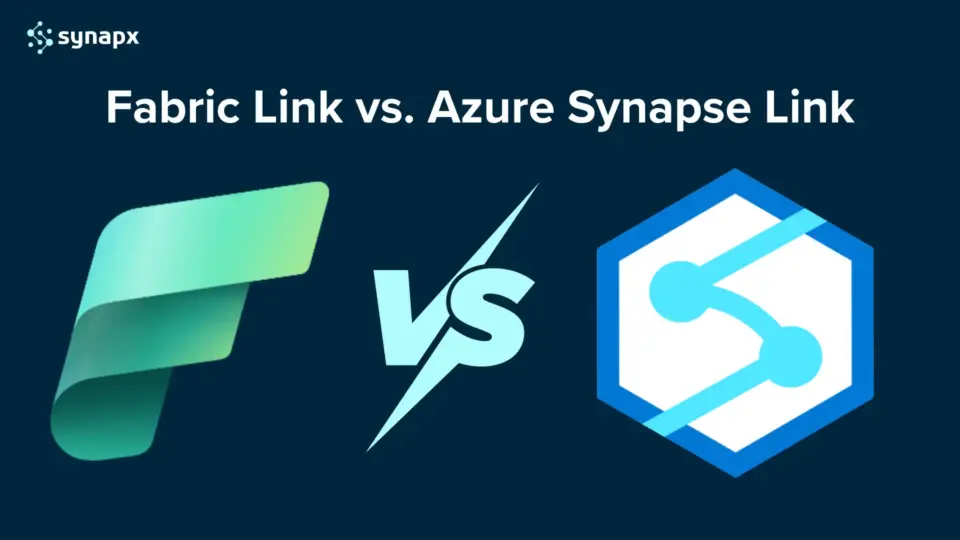
As Microsoft continues to evolve its data platform strategy, many organisations are asking the same question: should we use Fabric Link for Dataverse, or continue with Azure Synapse Link?
Both options enable organisations to move data from Dataverse into a scalable analytics environment. However, the architecture, capabilities and long-term direction differ significantly.
With Microsoft Fabric now positioned as the unified data and analytics platform, understanding how Fabric Link works — and how it compares to Azure Synapse Link — is critical for teams planning their data strategy.
This article breaks down the differences clearly, helping you decide which approach aligns with your reporting, analytics and governance goals.
What Is Fabric Link for Dataverse?
Fabric Link for Dataverse enables organisations to replicate Dataverse data directly into Microsoft Fabric in near real time, without complex ETL pipelines.
Unlike traditional data export methods, Fabric Link maintains synchronisation between Dataverse and OneLake, allowing analytics teams to build Power BI, Spark or SQL-based solutions on top of live operational data.
In simple terms, Fabric Link removes the need for separate integration tooling when working within the Microsoft Fabric ecosystem.
Why Not Connect Power BI Directly to Dataverse?
Connecting Power BI directly to Dataverse may sound simple, but it comes with serious limitations:
- It relies on the TDS (Tabular Data Stream) protocol, suitable only for small datasets.
- Real-time queries can timeout after five minutes.
- Managing relationships across large tables often leads to slow or incomplete reports.
That’s where Fabric Link and Azure Synapse Link come in, bridging the gap between Dataverse and scalable analytics in Fabric.
Fabric Link: The Simpler, Native Option
Fabric Link provides a direct, ETL-free integration that syncs Dataverse data into Fabric’s OneLake, no Azure setup or storage management required.

Key Advantages:
- Simplicity: One-click integration that automatically syncs all tables with change tracking enabled.
- Governed Data Access: Keeps everything within the Dataverse security boundary, maintaining compliance and governance standards.
- Selective Table Sync: Fabric Link now allows choosing which tables to sync, a major upgrade from earlier “sync everything” behaviour.
- Faster Sync Frequency: Refresh intervals have improved from 60 minutes to every 15 minutes, matching Synapse Link’s cadence.
- Ideal For: Operational reporting, real-time dashboards, and business intelligence
Limitations:
- Uses Dataverse storage, which may be expensive at scale
- Still not suited for very large datasets or heavy transformations
- Less architectural flexibility than custom Azure-based data pipelines
Best For: Teams prioritising simplicity, governance, and a “no-Azure-needed” approach.
Azure Synapse Link: The Advanced, Scalable Option
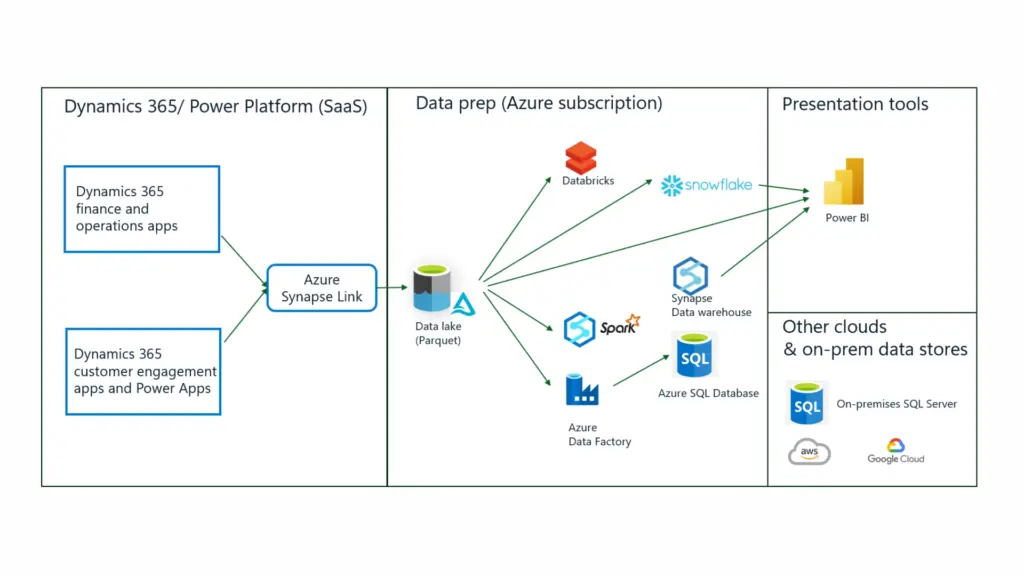
Azure Synapse Link exports Dataverse data into your own Azure Data Lake or Fabric workspace, giving you full control over data pipelines and transformations.

Key Advantages:
- Granular Control: Choose which tables to sync, no forced all-table replication.
- Performance: Refresh rate as fast as 15 minutes, ideal for big data scenarios.
- Flexibility: Integrates easily with Azure Synapse, Spark pools, Custom transformations and ML workflows and Data Factory for Delta Lake transformations.
- Scalability: Handles large volumes of data and complex transformation pipelines efficiently.
- Cost Optimisation: Pay only for the Azure resources you use, which may be cheaper for high-volume processing.
Limitations:
- Requires Azure knowledge (storage accounts, roles, permissions)
- Data moves outside the Dataverse boundary
- Slightly more complex initial setup.
Best For: Enterprises managing large data volumes, requiring high refresh rates, custom transformations, or hybrid Fabric-Azure pipelines.
Fabric Link vs. Azure Synapse Link: A Feature Comparison
| Feature | Fabric Link | Azure Synapse Link |
| Setup | Simple, direct connection to Fabric | Requires Azure storage + configuration |
| Data Control | Now supports selective sync | Full table-level control |
| Data Location | Stays within Dataverse; accessed via OneLake shortcuts | Exported to Azure Data Lake |
| Complexity | Operational reporting; simple patterns | Complex transformations; data engineering |
| Refresh Rate | Every 15 minutes (updated) | Every 15 minutes |
| Cost | Higher (Dataverse storage) | Potentially lower (Azure pay-per-use) |
| Governance | Strong, Dataverse-driven | Requires additional governance checks |
Azure Synapse Link was originally introduced to export Dataverse data into Azure Synapse Analytics for advanced analytics scenarios.
Fabric Link simplifies this process by integrating directly into Microsoft Fabric, reducing architectural complexity for organisations already adopting Fabric as their analytics platform.
The key differences typically come down to:
- Platform alignment (Azure ecosystem vs Fabric ecosystem)
- Complexity of setup
- Long-term Microsoft roadmap direction
- Unified analytics experience inside Fabric
For organisations modernising toward Microsoft Fabric, Fabric Link provides a more streamlined and future-aligned approach.
Dataverse vs Fabric: Are They Competing Technologies?
A common misconception is that Dataverse and Microsoft Fabric are competing platforms.
They are not.
Dataverse is an operational data platform designed to support business applications, particularly within the Power Platform ecosystem.
Microsoft Fabric is a unified analytics platform designed for reporting, data engineering, and large-scale analytics.
Fabric Link connects these two worlds.
Rather than replacing Dataverse, Fabric extends its analytical capabilities, enabling advanced reporting and data modelling without impacting transactional performance.
Why Do Businesses Need Writeback?
Writeback is becoming a critical requirement for analytics-driven organisations. It transforms dashboards from static insights to actionable workflows.
Adding Context with Annotations
Teams can annotate dashboards directly, for example:
- Explaining budget variances
- Adding comments on performance spikes
- Providing reasoning behind KPIs
This improves communication across finance, operations, and leadership teams.
Correcting Data and Managing Exceptions
Users can fix inaccuracies or update statuses without leaving Power BI, improving data quality at the source.
Scenario Planning & Forecast Adjustments
FP&A teams can:
- Adjust forecasts
- Modify assumptions
- Run what-if analyses
- Override AI predictions
All directly inside the report.
Triggering Operational Workflows
Writeback enables real-time decision-making:
- Raising maintenance tickets
- Approving requests
- Updating order statuses
- Triggering Power Automate flows
- Running backend SQL logic through Translytical Task Flows
This seamlessly connects analytics, action, and results.
Full Insight-to-Action Experience (Fabric)
Translytical Task Flows allow:
- Updates
- Inserts
- Deletes
- SQL procedures
- API calls
Directly from Power BI, removing the need to switch apps.
Why Fabric Link Creates More Business Value Than Synapse Link?
1. Real-Time Operational Insights Using Fabric Link
With Fabric Link’s direct, no-copy connection to Dataverse, organisations can build real-time Power BI dashboards that blend CRM, ERP, and external data sources without managing complex pipelines.
This is ideal for companies needing operational visibility, sales pipeline health, financial transactions, service workload, and inventory movement – all updated in near real-time inside Microsoft Fabric.
2. Unified Enterprise Lakehouse for Dynamics 365 + External Systems
Fabric Link enables organisations to consolidate Dataverse data directly into OneLake alongside data from:
- finance systems
- supply-chain software
- legacy databases
- IoT/sensor feeds
- web analytics sources
Unlike Synapse Link (which requires Azure Data Lake Gen2), Fabric Link simplifies the architecture by eliminating extra storage layers and enabling a single, governed lakehouse for analytics.
3. Enterprise-Scale Machine Learning and AI on Dataverse Data
By exposing Dataverse tables natively inside Fabric’s data science workloads, companies can train ML models that predict:
- customer churn
- inventory shortages
- service escalations
- sales cycle delays
- fraud or anomaly detection
This is something Synapse Link struggles with because Fabric provides a fully integrated ML environment, enabling data scientists to work directly on Dataverse data without the need for ETL.
4. Low-Code Apps and Automations Powered by Fabric Insights
With Fabric Link, insights generated in the Lakehouse (such as forecasting models, trend analysis, and scored datasets) can be written back to Dataverse as virtual tables.
This enables Power Apps and Power Automate to respond to signals such as:
- predicted late shipments
- high-risk customer accounts
- inventory below threshold
- potential revenue leakage
It closes the loop between analytics and action, something that traditionally required complex Azure pipelines.
5. Predictive & Prescriptive Analytics Across the Supply Chain
Companies can merge Dataverse operational data with manufacturing sensors, logistics feeds, ERP inventory levels, and demand signals to:
- forecast stockouts
- detect upcoming bottlenecks
- optimize fulfillment
- predict customer promise violations
Fabric Link simplifies the process because Dataverse data is additive, not duplicated. This reduces latency and increases accuracy.
6. Reduced Cost & Simplified Architecture (vs. BYOD or Synapse Link)
By eliminating:
- storage duplication
- complex ETL jobs
- pipeline maintenance
- separate Azure Synapse environments
Fabric Link delivers a future-proof, low-maintenance architecture. This reduces operational overhead and ensures the analytics stack remains flexible as the business grows.

How to Choose the Right Link?
Choose Fabric Link if:
- You want a quick setup and minimal configuration.
- Data security and governance boundaries are top priority.
- You’re building BI dashboards or lightweight operational analytics.
Choose Azure Synapse Link if:
- You handle large or complex datasets.
- You need high refresh frequency or custom data transformations.
- You want full control over your storage, pipelines, and compute.
In short, Fabric Link = simplicity and compliance, while Azure Synapse Link = scalability and control.
Build Smarter Data Connections for Your Organisation
Whether your business needs Fabric Link’s effortless integration or Azure Synapse Link’s scalable flexibility, the key is to align your data integration strategy with your analytics goals.
We have helped businesses design, implement, and optimise Microsoft Fabric and Dataverse architectures, so your data flows securely, efficiently, and intelligently across platforms.
If you’d like to learn more about Microsoft Fabric, our Microsoft Fabric Capacity Pricing blog explains cost structures and capacity considerations. At the same time, our blog on transitioning to Microsoft Fabric for Power BI Premium users covers what to expect during the move.
Need help deciding which link suits your organisation best? Talk to our Microsoft Fabric specialists today and unlock the full potential of your Dataverse data.