Microsoft has made AI feel more accessible than ever.
For small and mid-sized businesses, tools like Microsoft 365 Copilot promise to save time, reduce admin, and help teams work faster. On paper, that sounds like an easy yes.
But for most businesses, the real question is not whether AI sounds impressive.
It is whether it will actually make day-to-day work easier.
For teams already juggling meetings, emails, reports, and constant admin, time is often the biggest bottleneck. That is where Copilot is starting to get attention. It is built directly into the Microsoft tools many businesses already use, which means it fits into existing workflows rather than forcing teams to learn something completely new.
This matters because most businesses are not looking for “AI for the sake of AI”. They are looking for practical ways to work smarter without creating more complexity.
That is why more SMBs are now asking the same questions: what does Copilot actually do, how much does it cost, and is it worth paying for?
This guide answers those questions clearly, so businesses can decide whether it is the right fit.
What Is Microsoft 365 Copilot for Business?
Microsoft 365 Copilot is Microsoft’s AI assistant built into the tools businesses already rely on every day.
Instead of switching between separate apps or tools, users can work inside familiar platforms like Microsoft Word, Microsoft Excel, Microsoft Outlook, Microsoft Teams, and Microsoft PowerPoint and ask Copilot to help with tasks as they go.
In simple terms, it is designed to take care of the repetitive parts of work.
That could mean drafting an email after a meeting, pulling together a summary of a long document, helping spot trends in a spreadsheet, or turning rough notes into a presentation.
For smaller businesses, this is important because the biggest cost is often time. Many teams are already stretched, and a lot of that time disappears into routine work that adds little value.
Copilot is meant to reduce that friction.
What Does Copilot Actually Help with Day to Day?
The real value of Copilot is not in flashy AI features. It is in helping people get through work faster.
For example, a sales or operations team may spend hours each week replying to emails, chasing updates, sitting in meetings, and preparing reports. None of that is unusual, but it all adds up.
Copilot helps reduce some of that load.
In Outlook, it can help draft replies, summarise long email chains, and make it easier to catch up after time away. For busy managers or client-facing teams, that can remove a lot of back and forth.
In Teams, it can summarise meetings, pull out action points, and answer questions about what was discussed. That is useful for teams with lots of calls or for anyone who misses part of a meeting.
In Word, it can help with first drafts, summaries, and rewriting content. This can save time when preparing proposals, reports, internal updates, or client documents.
In Excel, it can help spot trends, explain data patterns, and support basic analysis. For teams that rely on spreadsheets but do not have dedicated analysts, that can make reporting much easier.
And in PowerPoint, it can help turn notes or documents into structured presentations, which saves time when preparing for meetings or client work.
Taken together, these are not small improvements. For many SMBs, they can remove hours of low-value admin each week.
How Much Does Microsoft 365 Copilot for Business Cost?
One of the biggest reasons businesses hesitated with Copilot early on was price.
That has started to change.
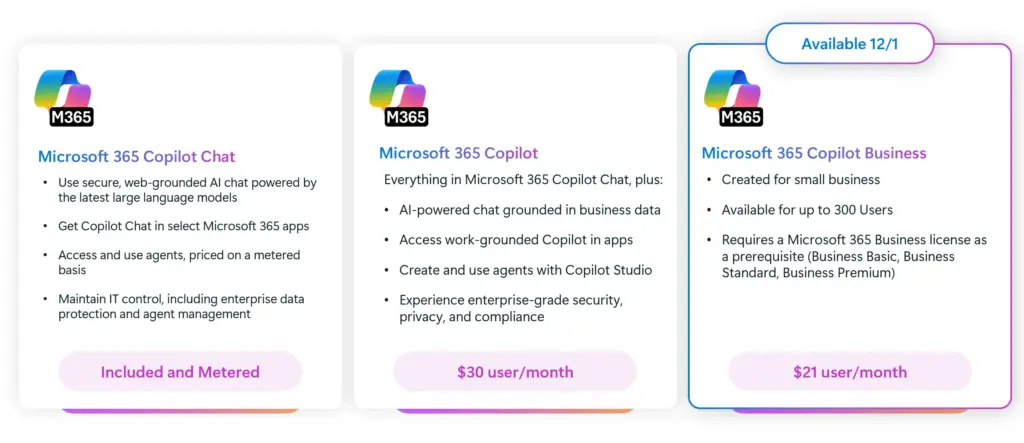
Microsoft has made Copilot more accessible for SMBs, especially for businesses already using Microsoft 365. Rather than feeling like a separate enterprise-only product, it is now much easier to add on to existing licences.
At the time of writing, pricing starts from around £14 per user per month as an introductory offer, with standard business pricing around £16 and enterprise tiers going higher.
On its own, that may not sound expensive.
But the real question for most businesses is not the monthly licence cost. It is whether people will actually use it enough to justify the spend.
For businesses where teams live in emails, documents, meetings, and reporting, the answer can often be yes. Even small time savings across multiple people can add up quickly.
For businesses with less structured workflows, the value may be harder to see straight away.
That is why cost should always be considered alongside the use case.
Is Microsoft 365 Copilot Worth It for SMBs?
For some businesses, Copilot can make a real difference.
For others, it may feel underwhelming.
The businesses that usually get the most value are the ones already working heavily inside Microsoft 365. Their teams are already spending time in Teams, Outlook, Excel, and Word, so Copilot fits naturally into how they work.
In these cases, the benefits are practical.
It can help people spend less time writing emails, sitting through follow-ups, preparing reports, and finding information. It can also make it easier for smaller teams to do more without hiring more people.
That said, Copilot is not a magic fix.
If a business has messy files, unclear permissions, or poor internal processes, AI will not solve those issues. In fact, it can sometimes expose them faster.
This is why some businesses rush in, buy licences, and then see very little return.
The businesses that get the best results are usually the ones that treat Copilot like any other business tool. They understand where it will save time, where it will not, and how to roll it out properly.
What Should Businesses Check Before Rolling Out Copilot?

This is where many businesses get caught out.
Copilot only works as well as the systems behind it.
Because it pulls information from Microsoft 365, businesses need to be confident that their files, permissions, and data are already in a good place.
If SharePoint libraries are messy, folders are outdated, or access controls are unclear, Copilot may surface the wrong information or create confusion.
That is why governance still matters, even if it is not the first thing most businesses think about.
Before rollout, businesses should check whether their teams are storing files properly, whether access is secure, and whether there are any obvious risks around sensitive data.
They should also think about user adoption.
Even the best tools get ignored if people are not shown how to use them. A short rollout plan, basic training, and a few clear use cases often make the biggest difference.
How SMBs Can Get Real Value from Copilot?
The businesses seeing the best results are usually the ones starting small.
Instead of buying licences for everyone at once, they begin with a small pilot group. That might be a sales team, operations team, or leadership group where time savings are easy to measure.
From there, it becomes easier to see what is working.
For some teams, the biggest win may be meeting summaries. For others, it may be proposal writing or faster reporting. The key is to focus on the tasks that waste the most time today.
Once those early wins are clear, rollout becomes much easier and far less risky.
This approach also helps businesses avoid paying for licences that go unused.

The Bottom Line
Microsoft 365 Copilot has real potential for SMBs.
It is no longer just an enterprise tool or a future-looking feature. For many businesses, it can already make day-to-day work easier.
But the value is not in the AI itself.
The value comes from saving time, reducing admin, and helping teams work more efficiently.
For businesses that are already set up well inside Microsoft 365, Copilot can be a smart investment.
For those with messy systems or no rollout plan, it can quickly become another subscription that sounds good but delivers very little.
The businesses that benefit most are the ones that focus less on the hype and more on where it can make a practical difference.
Ready to evaluate Microsoft 365 Copilot for your business?
Synapx works with SMBs across the UK to assess Copilot readiness, design governance frameworks, and manage deployments from pilot to full rollout. We give you an honest view of where you are and a clear path to where you want to be. If you’d like to learn more about Microsoft Copilot and how it works across use cases, our Microsoft Copilot guide provides a detailed overview of features, benefits, and real-world applications.
Book a free Copilot readiness consultation with us. No commitment. No sales pressure. Just a clear conversation about your readiness and your options.